

Edit a maintenance event
The Maintenance View allows the on-site Maintenance Department to record comments against the equipment units they are maintaining or repairing. Reports generated from the view provide a way to monitor the repair process and turnaround times for different equipment types.
Before working with the Maintenance view, the user-defined columns must have been configured. See Maintenance View: Configuration.
The view will only display those equipment units that have been assigned a primary status = Down.
- Click the Maintenance View button. A data grid showing all maintenance events in the Production database is displayed.

- Select the event you want to edit:
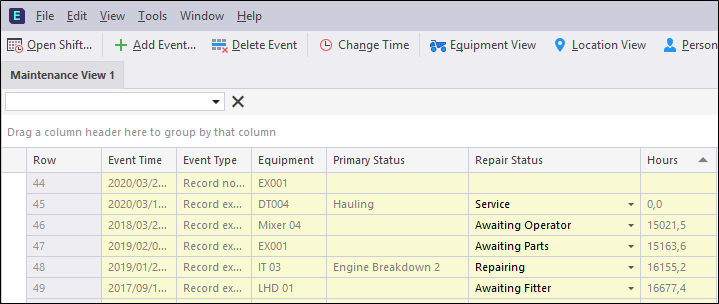
The columns you can edit will either have an edit box or a drop-down selection box:
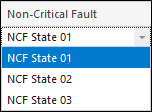
The following columns can be edited:
- Event Time. The date-time that the equipment unit was originally assigned the Down status.
- Equipment. The name of the equipment unit.
-
Primary Status. Initially, this is the originally assigned Down status. It can be changed to another Down status from the list of Down states.
Editing the Primary Status does not change the Event Time or the Hours values. These values are directly related to the time that the unit was originally assigned to a Down status
- Hours. The hours and minutes since the equipment unit was originally assigned to a Down status.
-
User defined columns. Any alphanumeric can be entered into the comments area.
An Equipment Timeline with Maintenance Comments report can be run in the Reporting service. For more information, refer to Reporting Service .
The Event Editor can be configured on-site to only display a Maintenance View. Contact your Micromine Pitram Administrator to configure the Event Editor for Maintenance only.