

Edit a movement event
- Click on the Movement View button.
A data grid showing the Movement events recorded against the shift is displayed.
- Select the event you want to edit in the Events data grid:

Typically, the columns that are editable will be readily available in the data grid, while less important columns will be hidden. For the columns that can be edited, pick-lists are provided wherever possible to ensure that existing column values can only be replaced by valid values for that column.
The data grid allows you to view events sequentially, as they occurred during the shift. The ramifications of any changes you make to an event will be shown in subsequent events.
When entering measures or other numeric data, validation is performed to ensure that the entered value is valid for that column.
The Change Time button can be used to edit the Date/Time of an event.
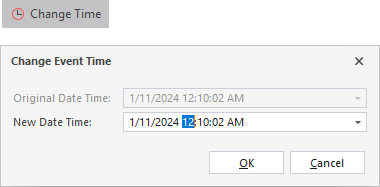
You can also change the time of an event by deleting it and replacing it with an event with a new date and time. For auditing purposes, it is recommended to use the Change Time button where available.