

Edit Details
When you select Administration | Manage Reports | Edit existing report , select a report to edit and then click the Edit button, the details of that report are displayed:
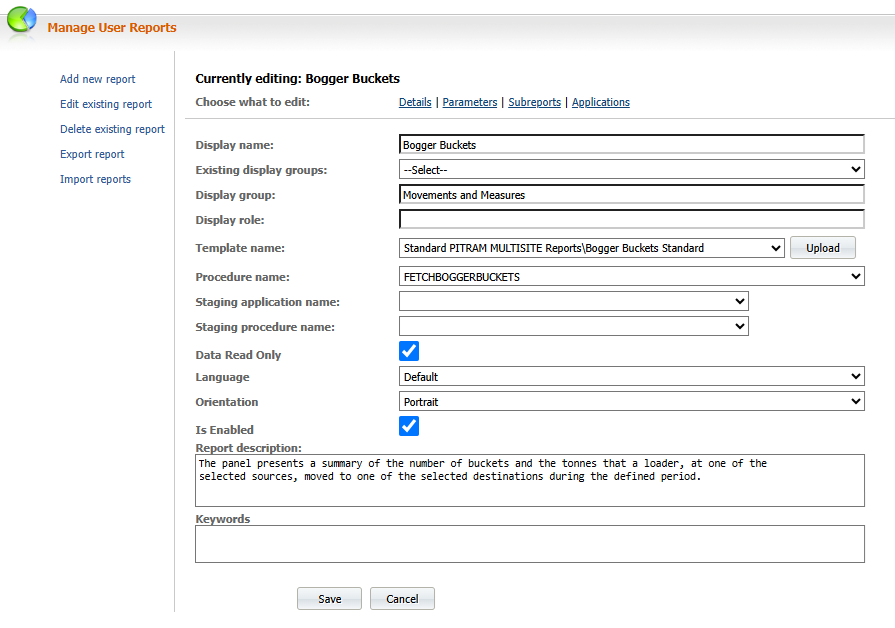
Details window fields and options
The Details window includes the following fields and options:
Display name
The name of the new or edited report.
Existing display groups and display group
The name of the group to which the report belongs. For example, Movements and Measures or Maintenance. To change the Display group, select an option from the Existing display groups list.
Display Role
The name of the user role to which the selected report and groups belong.
Template name
The name of the report template (if any is used) from which the report was derived. Templates are created using CRYSTAL REPORTS™. Click Upload to upload a new report template.
Procedure name
The name of the procedure the report was derived from. Procedures are an underlying part of the Reporting system and are the mechanism by which data is retrieved from the Application Connector.
Staging Application
The Connector on which the staging of report data occurs. To select an application, choose it from the drop down list.
Staging Procedure Name
The procedure on the selected application that is used to stage the report data. To set the staging procedure, select it from the drop down list.
Data Read Only
Select this check box if the data retrieved for the report is to be read-only. If this option is selected, you will not be able to modify data using the data browser.
Language
Accept the default language (English, UK) or select a language option for the current report.
Orientation
Select a Portrait or a Landscape page orientation.
Is Enabled
This check box, when selected, indicates that the report is active and can be selected from the Reporting list, If the Is Enabled check box is unchecked, it will be removed from the selection list in the Reporting screen.
Report description
Enter a brief description of the purpose and/or content of the report.
Keywords
The keywords entered for a report are used (with the Report title) by the Pitram Portal Reporting Search function. Specific keywords can be used to uniquely identify a report. More generic keywords can be used to identify and group the report with reports of a similar type.