

Manage Roles
On the Services ribbon: Select System | Administration | Manage Roles to manage user roles.

The Pitram Portal services that are available to a user after signing-in will depend on the roles that he or she have been assigned by an administrator.
To define roles:
- Select the System service.
- Select Manage Roles in the Administration pane. The manage roles screen appears.
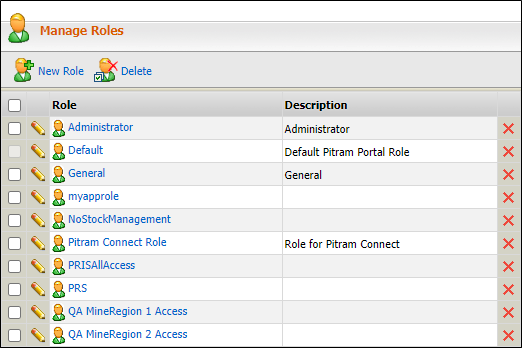
- To define a new role and any associated actions, click the New Role option.
- To delete one or more selected roles, click the Delete option. Alternatively, to delete a single role, click the Delete icon at the right of each row.

- To edit roles, click the Edit icon at the left of each row.

Users and roles
Each user is granted one or more roles that defines the actions available to that user. For example, an action can be the permission to use the Reporting service or the Target service. A user can have many roles and each role can have one or many actions.
The roles available are either:
Administrator
Each Pitram Portal installation has at least one Administrator defined. The Administrator has access to all services. Administrators can create, edit and delete other roles.
User
A User can be allocated access to either:
- All services except the System services, which is the restricted to the Administrator.
- A specific and limited set of services.
The Default User role
There is a special user role called Default User. This is the role automatically assigned to the first user of Pitram Portal on site. It is assigned so that Pitram Portal can be accessed to define the Administrator and other roles. When a specific role is not assigned to a user name, the role of Default User is automatically granted and can be held indefinitely. The Default role has access to the set of services defined on site for that role.
A user with a Default role is able to:
- Generate and view available reports when Reporting is selected.
- Import and display Target entries.
- View items in the Library.
- Launch, but not modify, existing Dashboards.
The Default role cannot be deleted or renamed.
User, roles and services
The user name-role relationship can be made up of a user name with one or many roles. Each role can have one or many actions or services. For example:
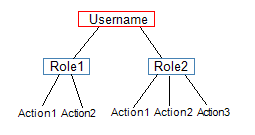
where an action is one of the Pitram Portal services.
See: Add and Edit Roles