

Dynamic Activity Sheet
A Dynamic activity sheet field is not visible to the standard reports service and can only be modified by a System Administrator or a Micromine Australia Pty Ltd consultant.
Fields
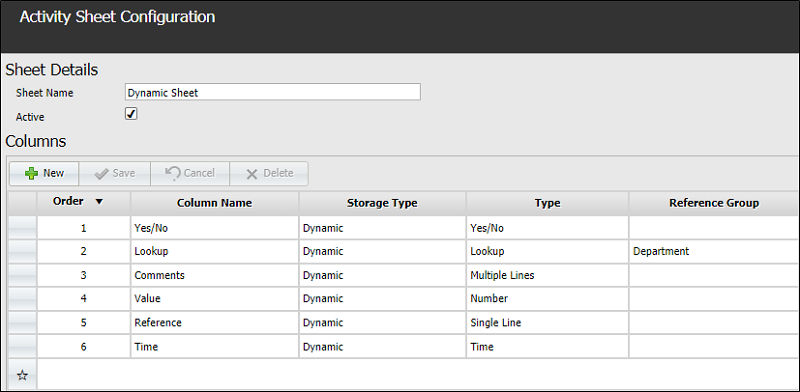
- Order - Determines the row order in which the newly created column will displayed.
- Column Name - The name of the column in which the field appears.
- Storage Type - The storage type for the field; in this case, Dynamic.
- Type - The field type. You can select from several field types for Dynamic fields. These options are detailed in Create an Activity Sheet.
- Reference Group - A reference group is a data type that can hold several types of Lookup Active Lists. It is used to filter data. If no reference group is specified, no filter will be applied to the data, so all data will be shown. Reference groups are configured using the Reference Edit service.
- Active List - Active lists provide a mechanism for filtering data to create subsets based on criteria of interest. If <No Active List> is specified, the data is not filtered and so all data will be displayed in the lookup lists. You can Creating and Updating an Active List in the Reference Edit service to keep up with changes on site.
- Field Name - A brief description name used to define the field.
- Minimum - For a numerical field, set the lowest permissible value.
- Maximum - For a numerical field, set the highest permissible value.
- Decimal Places - For a numerical field, defines the precision in decimal places.
- Active - The new field becomes available to operators to modify.
- Required - If this option is selected, there must be an entry for the column in every record.
A sample Activity Sheet Configuration containing the above data types could look as follows:
Click Save to finish editing the column configuration.