

Process a shift
To generate a report of a saved timesheet, the timesheet must be processed. Processing transfers the timesheet information to the reporting database and the Reporting service is then used to generate a report.
You can execute a Process for either:
- A single shift.
- A collection of individually selected shifts.
- All shifts in the period of interest.
Procedure
Process the shifts for 28 July, 2021 - both Day and Night

Display the shifts of interest. This can be achieved by selecting the following values :
| Tool | Select |
|---|---|
| Month | July |
| Year | 2021 |
The shifts displayed in the workspace include all shifts for the period 01/07/2021 to 31/07/2012 inclusive.
The Rosters and Crew drop-down lists are filters that can be used to create a subset of the shifts displayed.
Tick  the check box on the far-left to select both shifts on the chosen date:
- Night Shift Production Wednesday 28 July 2021.
- Night Shift Development Wednesday 28 July 2021.
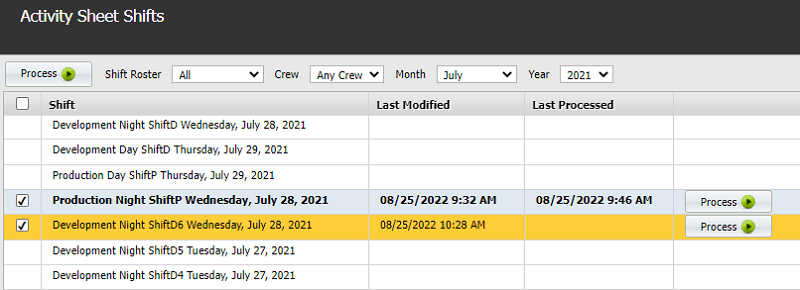
There are three ways that you can select the shifts:
Select All
Click the Select All check box at the top-left of the workspace. This will select all the shifts in the workspace. Click Process Shifts  on the header and all the selected shifts will be processed.
Clear the tick from any shifts that you don't want processed by clicking on them.
Select individual shifts
Select any number of the check boxes to the far-left of each shift. Click Process Shifts and the selected shifts are processed.
Manually process individual shifts
Click Process  on the far-right of each shift to process that shift.
Here you have selected two shifts.
Click Process Shifts on the header. You will find that the Last Processed column on the workspace now has the date-time for when it was processed.
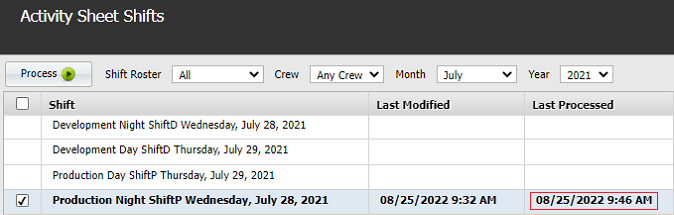
The Process function is only available if a timesheet has already been saved for that shift.
Once a shift has been processed, timesheet reports can be generated in the Reporting service.
If you change a timesheet, or add another timesheet to a processed shift, you must repeat the Process function.