

Shifts
Open Shifts
When you select the Activity Sheet service the Shift option is displayed by default. Also, the most recent shift is selected by default. Any unprocessed shifts are displayed with highlighting as shown below:
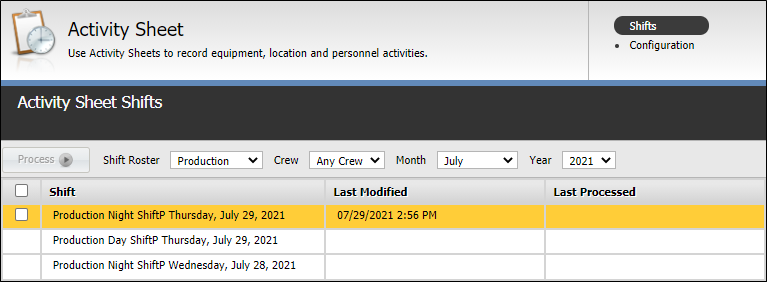
Double-click on the shift of interest to bring up the Activity Sheets associated with that shift.
If timesheets have been edited since the last shift was processed, the shift must be reprocessed to update the Reporting database. Highlighting is removed when the shift is processed and the Last Processed value is updated.
If a shift has data to be processed, it will display with a check box on the left, signalling that the shift can be selected for processing. If there is no data for the shift, the check box is not displayed, signalling that there is no data to be processed and that the shift is not available for processing.
Process Shifts
Shifts can be processed in three ways:
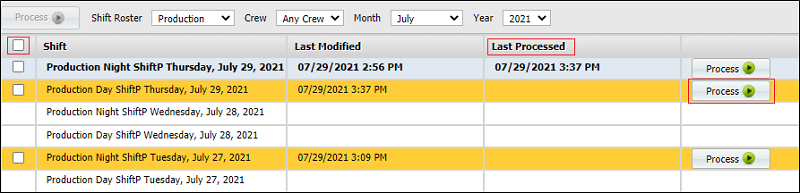
Process a single shift
If a record contains a timesheet that has been saved for that shift, click on Process at the far right of the shift record.
Click  Yes on the confirmation form.
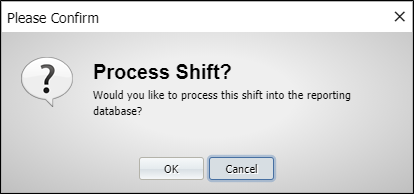
All timesheets in the selected shift are processed. The date-time that the record was processed is listed in the Last Processed column.
Process all shifts
A Shift selection box is available for selection above the list of shifts:

Click this check box to Select All shifts in the list. A tick is displayed in all of the checkboxes to signify that all shifts have been selected.
Having selected all shifts, click Process in the toolbar.

Click Yes on the Confirmation dialog.
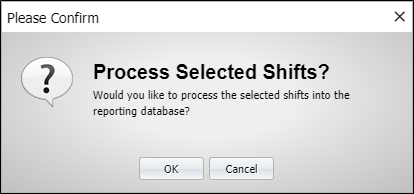
Timesheets for all shifts will be transferred to the Reporting database.
Process selected shifts
A selection box is available for each shift in the list that can be processed.
Click the check box for each shift you want to process.
Tip: To select a majority of the shifts in the list, click Select All (Shift) check box and then deselect those shifts you do not want to process.
When you have selected your shifts, click Process.
Timesheets for the selected shifts are transferred to the Reporting database.
The Last Processed column displays the processing time/date for each shift.