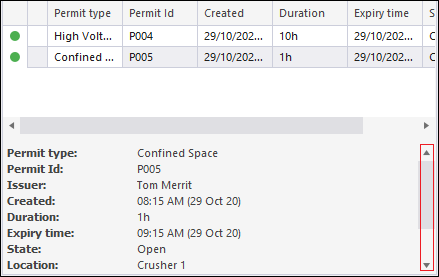
Permits pane
Use the Permits pane to issue permits for people working in or moving through controlled areas. When you create a Permit Controlled Area panel, a Permits pane is docked to the left of the Controlled Area panel by default. If you prefer, you can undock the pane and drag it away from the panel. You can also pin or hide the pane so that more of the Controlled Area panel is visible. See: Docking a window pane and Auto-hiding a window pane.
When you work with permits, the permits in the Permits pane can be in one of three states:
Inactive
When you Create a permit, it is added to the Permits pane and is inactive. It has not yet been issued to a controlled area.
Active
When you Create a permit controlled area, a green circle is used to indicate the fact that the permit is active in a controlled area.

Logged
When people have been logged at (assigned to work within or pass through) a Permit Controlled Area, a red circle is used to indicate the fact that the permit is active in a logged controlled area.
Properties
Use the up/down arrows in the lower half of the Permits pane to browse the properties of the permit selected in the data grid.