

Automatic Status Change
The status of a unit of equipment or location can be configured to change automatically, given the occurrence of an event.
For example, when a Bogger with an Operating status is allocated to a location, its status will change to Tramming automatically.
When a Development Drill has reported its achieved measure, the drill's location is automatically set to Charging.
When a Carrier breaks down, its attachments are automatically set to Idle.
The configuration for these automatic status changes is undertaken in the Reference Edit service.
Working with automatic status changes
To ensure that equipment and location status changes automatically, the steps are:
- Access the Reference Edit service by clicking on the icon
 on the services toolbar.
- Deploy the appropriate reference data groups—if they have not already been deployed.
- Define the appropriate active lists. An active list will include sets of equipment and location tokens that will be involved in automatic status change. For example, a list of the equipment units in the Hauling active list.The members of this list will be assigned a Tramming status when assigned to a new location.
- Define the appropriate Equipment Status Rules and the appropriate Location Status Rules. Ensure that all changes to Reference Edit are published, so that they are available to the rest of Micromine Pitram.
- Watch automatic status changes taking place in Data Acquisition.
Status: A review
At all times during a shift, units of equipment and locations are assigned a status. The status tells us what the unit is doing, or what is currently happening at the location. Micromine Pitram works with:
- Equipment states. Each piece of equipment must have a primary status (Operating, Delay or Idle status). In addition, trucks and loaders, for example, can have a cycle status (Travelling Empty, Queuing, Loading and Hauling). The automatic status change is only applicable to equipment primary states.
- Location states. This includes states such as Blasting, Face Flooded, Charging, and Firing, for example. These states tell us what is happening at the location.
The list of states are customised at the site. Equipment and location status changes are saved as events in the database.
Working with active lists
Rather than defining the status change for a specific unit of equipment or for each specific location, the automatic status change is applied to all units of equipment or to all the locations listed in the selected active lists. An active list groups equipment, locations or states that are identical. For example, when any of the production drills completes the work at the current location, it is allocated to a new location. When the final measure is entered, the drill status is automatically set to Tramming - the drill progressing to the new location.
For example, you want a status change to be applied to:
- Each drill listed in the Production Drill Equipment active list.
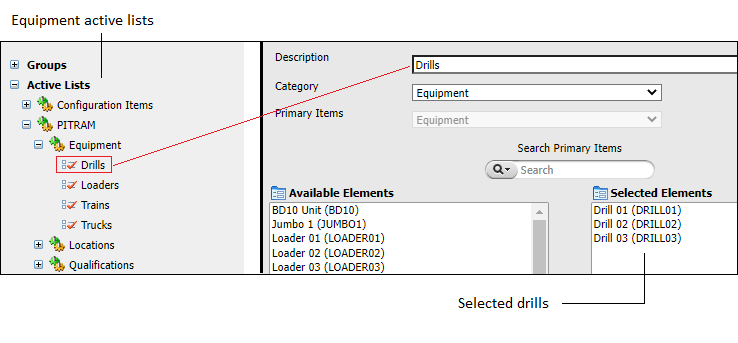
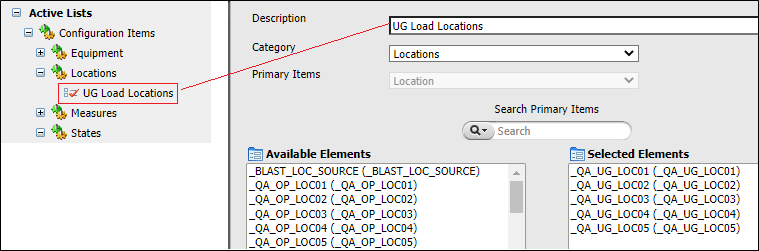
- The drills found at any of the locations listed in the UG Load Locations active list.
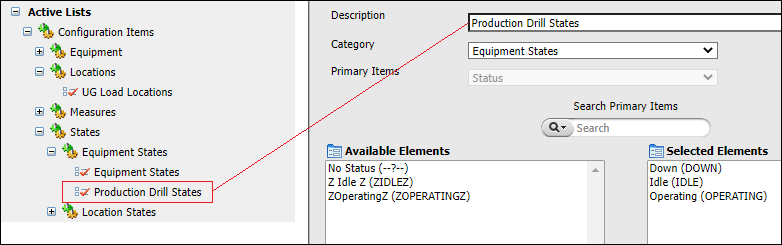
- Any drill that is currently in any of the states defined by the Production Drill States active list.
The active lists that you have defined at your site may be very different from the examples above.
You will find the appropriate active lists under Active Lists on the navigation pane.
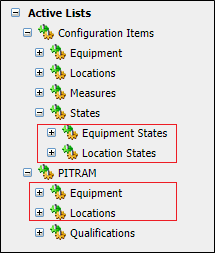
There is more than one way to define any of the automatic status changes. It depends on what you want to achieve at your site and also on which active lists are available.
Before you can work with automatic status change, you must have the appropriate reference data groups listed on the navigation pane. Then you can define the equipment and the location status changes. To achieve this, refer to Deploy the reference data groups below.
Deploy the reference data groups
To work with automatic status change, you need to have access to the appropriate reference groups in the navigation pane:
Status selection modes
When you define a status change you will find the StatusSelectionMode attribute listed in the dialog. There are four possible ways to define how the actual change is implemented.
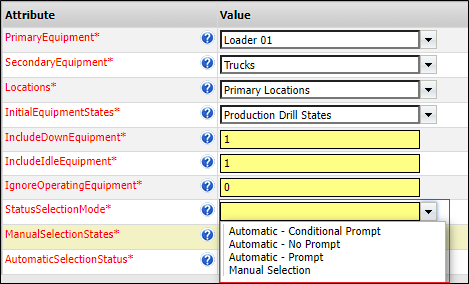
They are:
-
Automatic - No Prompt. The status will be changed without any notification.
- Automatic - Prompt. The defined status will be presented. The Control Room Operator must select the appropriate response to a Yes/No message.
- Automatic - Conditional Prompt. The status is changed, conditional on the percentage achievement of a target measure.
- Manual - Selection. The Control Room Operator must select the appropriate status from a definitive list of states.
Select the mode taking into account how appropriate it is for the status change that you are defining.
Conditional prompt modes
Automatic - Conditional Prompt mode is a special type of status change mode. It is only applicable to two of the Location Status Rules, which are:
- EntryOfMeasureAgainstEquipLR. The location status is set to change when a measure is entered against a unit of equipment.
- EntryOfMeasureAgainstLocLR. The location status is set to change when a measure is entered against a location.
A Conditional % attribute is included in the dialog when defining the above two location rule types. If you do not have this attribute in the dialog, you will need to Deploy the Reference Data group and the Conditional % attribute for each of the rule types.
These location rules have two extra attributes to define:
- Conditional %. This defines the percentage of a measure target that must be achieved before the status of the location will be changed. For example, the tonnage target for a loading location is 400 tonnes. If the Conditional % is defined as 100%, the location status will not be changed unless at least 400 tonnes have been recorded against the location.
- LocationTargetAttribute. This defines the attribute that identifies the measure target for the location. For the example above, the tonnage target is defined in the Planned Tonnes attribute for the particular loader location.
The status change is made, conditional on the performance of a location to meet its target measure. Thus, the three attributes, StatusSelectionMode, Conditional% and LocationTargetAttribute, work together when the StatusSelectionMode = Automatic - Conditional Prompt.
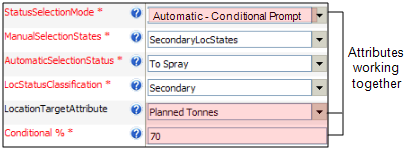
The measure targets for a particular location are defined in the Reference Edit Groups | Micromine Pitram | Locations | Location. For example, for LocA the planned attributes are defined as:
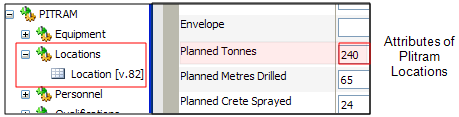
If Conditional % = 70, for example, the conditional prompt mode implements the status change in the following way.
If the planned measure is between:
- 0 and less than 70: No status change is made.
- 70 and 100%: A status change with a prompt message is displayed.
- Greater than 100% of the planned measure. The status change is implemented without a prompt. The bogger has achieved its target and is ready to move to another location!
If the status selection mode is set to Automatic - Conditional, when an equipment or location measure is entered, the current cumulated measure is compared with the defined Conditional %. The appropriate status change is implemented according to the three possible scenarios listed above.