

Before you are able to configure automatic status changes at your site, you must have the appropriate reference data groups available in the navigation pane in Reference Edit. In this exercise, you will learn which groups to deploy and how this is achieved.
To deploy the reference groups in Reference Edit:
- Select Other Actions | Deploy Reference Data from the drop-down box on the navigation header.
- In the Deployment dialog, go to Configuration Items | States | Equipment Status Rules and select the following options:
Select Option 
EquipAllocatedToLocER EquipDeallocatedFromLocER EquipChangedToStatusER EntryOfMeasureAgainstEquipER - Go to Configuration Items | States | Location Status Rules and select the following options:
Select Option EquipAllocatedToLocLR EquipDeallocatedFromLocLR EntryOfMeasureAgainstLocLR
Make sure that all the attributes are selected.
EntryOfMeasureAgainstEquipLR
Make sure that all the attributes are selected.
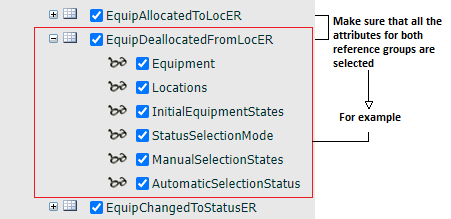
- Go to Configuration Items | States and select StatusSelectionMode. You will have the following selected:
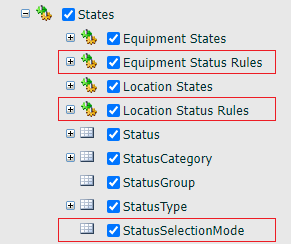
- Click OK to save the settings and close the dialog
- Go to Groups | Configuration Items | States | Equipment Status Rules and to Location Status Rules and you will find the reference data groups that you have just deployed.
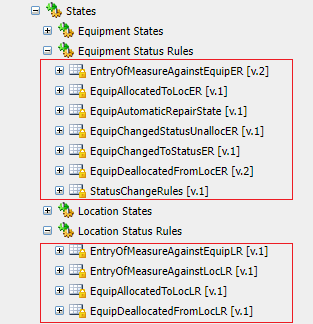
- When defining a status change token you will find the StatusSelectionMode attribute listed. This attribute refers to the way that the status change is executed. It can occur automatically (in a number of ways) or manually. In the manual case, the Control Room Operator will be prompted to manually select from a list of possible states.
You are now ready to define the status changes that you want to occur automatically.