

Status and Reference Edit
A status is allocated to equipment and to locations. It is used to describe what a unit of equipment or a location is doing. Is the unit of equipment operational, idle or down? Is the location blasting or drilling? Each change of status is a time-stamped event in the Micromine Pitram database.
States provide us with a true picture of the activity and decisions made with reference to the equipment unit or location during the shift.
In summary, the different status types are:
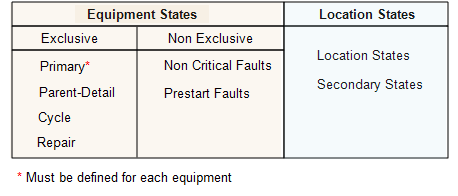
Status hierarchy
Assigning states to a unit of equipment or to a location is a way to build up a picture of the activity on site. This information can be summarised in reports used to evaluate how long it takes to repair a drill, to compare the performance of the hauling fleet from shift to shift, and to analyse the relationship between equipment failure and location productivity.
Status works as a hierarchy. The hierarchy starts at the highest or broadest level, and moves downward to lower or more detailed levels. It is the detailed level that is assigned to a unit of equipment or to a location. You can think of it in much the same way as we have a hierarchy for time—year->month->day->hour->minute->second. Year is the broadest: second is the most detailed.
The status hierarchy is defined in Reference Edit.
For example, go to:
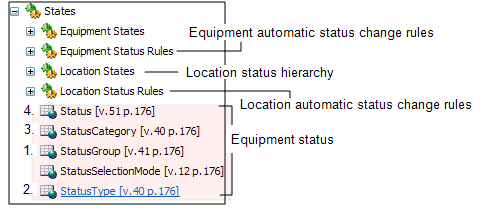
Groups | Configuration Items | States. Here you find the Equipment States, the Equipment Status Rules, the Location States and the Location Status Rules folders.
The location states are stored in reference data groups under Location States. The equipment states are listed under the States group.
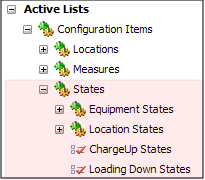
Equipment and location states can be grouped into active lists.
They are found on the navigation pane at:
Active Lists | Configuration Items | States | Equipment States and Location States.
A location status hierarchy has the following levels:
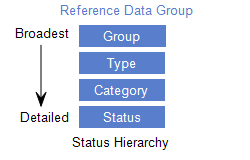
In the example above, a status must belong to a Category; a Category must belong to a Type; a Type must belong to a Group. Group is the highest level of this hierarchy. Therefore, the Group must be defined before the Type: the Type must be defined before the Category and so on.
You may want to report on the units of equipment that were Operating (Group level) and the total hours of those that were Bogging (Status level).
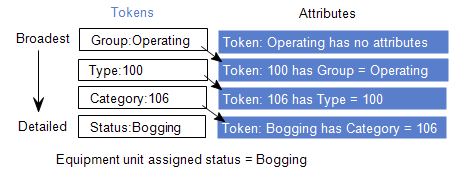
There must be a direct connection from the Status level, up to the Group level for the reports that you generate to be able to produce accurate information.
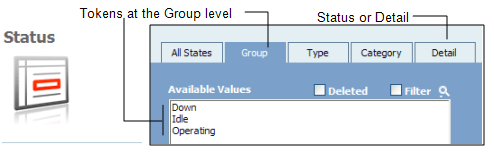
In the Reporting service, you see the status hierarchy displayed as a set of tabs above the Available Values area.
Null token
A Null or no value token can be defined for any reference data group. This token is defined as follows:
- Code: --?--
- Abbreviation: Any value.
- Description: Any value.
A Null token can be used to identify equipment, locations or states, for example, for which there is no value.
Equipment states
Equipment states are dived into two groups:
-
Exclusive. A unit of equipment can have only one of each of the exclusive states at any time: one primary status, one parent status and one cycle status. It must have a primary status: other equipment states can be selected as required.
-
Non-exclusive Equipment States. A unit of equipment can have any number of either of these types of states. For example, it can have more than one non critical or prestart faults.
Location states
Location states have a similar hierarchical configuration to that of equipment states.