

Locations Status Changes
A status change may be applied to a location when:
- A measure is entered against a unit of equipment at the location. For example, a charge up wagon reports the Holes Charged, the location status is set to Ready to Blast. In Reference Edit, this type of location status change is referred to as EntryOfMeasureAgainstEquipLR.
- A measure is entered against the location. For example, a development drill has finished at the face and calls-in the face holes drilled and the location status is set to Charging. In Reference Edit, this type of location status change is referred to as EntryOfMeasureAgainstLocLR.
- An equipment unit is allocated to the location. For example, a development drill is allocated to a location and the status of the location is changed to Drilling. In Reference Edit, this type of location status change is referred to as EquipAllocatedToLocLR.
- An equipment unit is deallocated from the location. For example, a bogger is deallocated from a face, the status is set to Bogged Out. In Reference Edit, this type of location status change is referred to as EquipDeallocatedFromLocLR.
Status Selection Mode: Conditional Prompt
Automatic - Conditional Prompt mode is a special type of status change mode. It is applicable to the following Location Status Rules:
- EntryOfMeasureAgainstEquipLR. The location status is set to change when a measure is entered against a unit of equipment.
- EntryOfMeasureAgainstLocLR. The location status is set to change when a measure is entered against a location.
Conditional %
A Conditional % attribute is included in the dialog when defining the above two location rule types. If you do not have this attribute in the dialog, you will need to deploy the Conditional % attribute for each of the Rule types.
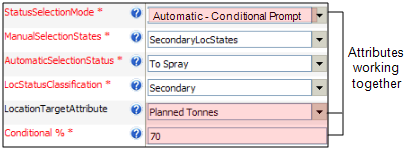
These location rules have two extra attributes to define:
Conditional % defines the percentage of a measure target that must be achieved before the status of the location will be changed.
For example, the tonnage target for a loading location is 400 tonnes. If the Conditional % is defined as 100%, the location status will not be changed unless at least 400 tonnes have been recorded against that location.
LocationTargetAttribute
LocationTargetAttribute identifies the measure target for the location. For the example above, the tonnage target for the loader location is defined by a Planned Tonnes attribute.
A status change is made, conditional on the performance of a location to meet its target measure. Thus, the three attributes, StatusSelectionMode, Conditional% and LocationTargetAttribute, work together when the StatusSelectionMode = Automatic - Conditional Prompt.
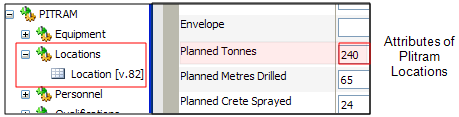
In Reference Edit, the measure targets for each location are defined under Groups | Pitram | Locations | Location. For example, Planned attributes for LocA are defined as:
If Conditional % = 70, for example, the conditional prompt mode implements the status change in the following way:
- Between 0 and less than 70% of the Planned measure: No status change is made.
- Between 70 and 100% of the Planned measure: A status change with a prompt message is displayed.
- Greater than 100% of the Planned measure. The status change is implemented without a prompt. For example, a bogger has achieved its target and is ready to move to another location.
If the status selection mode is set to Automatic - Conditional, when an equipment or location measure is entered, the current cumulated measure is compared with the defined Conditional %. The appropriate status change is implemented according to the three possible scenarios listed above.