

Equipment Status
Equipment states are dived into two categories:
- Exclusive
A unit of equipment can have only one of each of the exclusive states at any time: one primary status, one parent status, and one cycle status. An equipment unit must have a primary status: other equipment states can be selected as required. Exclusive Equipment States
- Non-exclusive
A unit of equipment can have any number of either of these types of states. For example, it can have more than one non critical or prestart faults. Non-exclusive Equipment States
Status Changes
A status change may be applied to a unit of equipment when:
- A measure is recorded. For example, the last drilling measure has been recorded and the status of the drill is set to Tramming or Shift Change. In Reference Edit, status changes of this type are defined in Groups | Configuration Items | States | Equipment Status Rules | EntryOfMeasureAgainstEquipER.
- A status change to a primary unit triggers a status change to its secondary units. For example, if the status of a primary unit changes to a Down status, the status of its secondary units are changed to an Idle status. In Reference Edit, status changes of this type are defined in Groups | Configuration Items | States | Equipment Status Rules | EquipChangedToStatusER.
- The equipment is allocated to a location. For example, a loader is allocated to a loader and its status is set to Operating. In Reference Edit, status changes of this type are defined in Groups | Configuration Items | States | Equipment Status Rules | EquipAllocatedToLocER.
- The equipment Is deallocated from a location. In Reference Edit, status changes of this type are defined in Groups | Configuration Items | States | Equipment Status Rules | EquipDeallocatedFromLocER.
Status selection mode
When defining a status change you must select one of four StatusSelectionModes:
-
Automatic - No Prompt. The status will be changed without any notification.
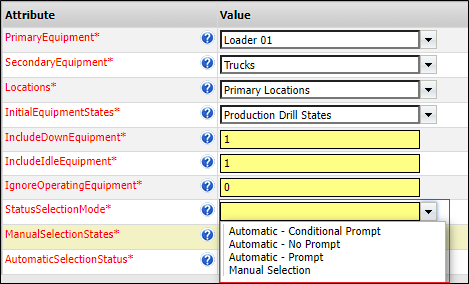
- Automatic - Prompt. The defined status will be presented. The Control Room Operator must select the appropriate response to a Yes/No message.
- Automatic - Conditional Prompt. The status is changed, conditional on the percentage achievement of a target measure.
- Manual - Selection. The Control Room Operator must select the appropriate status from a definitive list of states.
Data Acquisition
When an equipment automatic status change occurs in Data Acquisition a message which refers to Historic data may be displayed:

For historic data to be included, Data Acquisition must be connected to the Pitram Portal in order to access the Reporting database.
For more information refer to the 'Automatic Shift Changes' section of the Data Acquisition online help.