Suspend or cancel a permit
When a permit has been created, you may be able to suspend or cancel the permit. This will depend on the type of permit.
Note that you cannot suspend or cancel a permit which is active in a controlled area. Before you can suspend or cancel a permit, you will need to remove people logged at the Permit Controlled Area and then close the controlled area.
Cancel
You may want to cancel a permit when it is no longer needed following a change in the shift plan.
To cancel a permit:
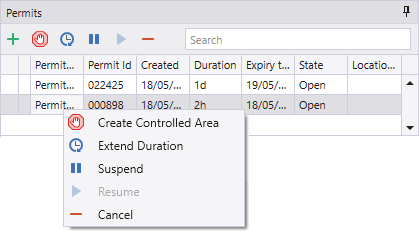
- Right-click on the permit and select Cancel.
The permit is removed from the Permits pane.
Take care before you cancel a permit. There is no undo facility.
Suspend
A permit to work in a high voltage area may be suspended, for example, when there is a review of safety procedures related to electrical work.
When the review is complete, the permit can be resumed.
To suspend a permit:
- Right-click on the permit and select Suspend.
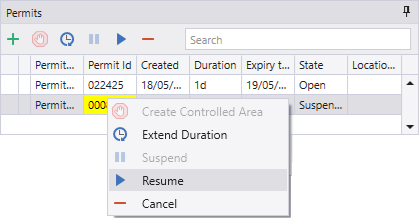
When you suspend a permit, you cannot create a controlled area or modify the editable properties of the permit. A suspended permit is shown in yellow in the data grid.
Resume
To resume a suspended permit:
- Right-click on the permit and select Resume.