Ending a shift
Note: While you can manually start and end a shift in Data Acquisition, a shift does not depend on Data Acquisition in order to run. Shift start and end times can be configured automatically as part of the Pitram server configuration.
To manually end a shift:
- Select the File | Shift End menu option.
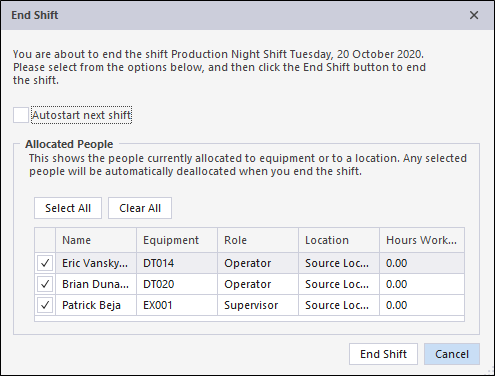
A number of options and a confirmation message will be displayed before ending the shift.
Autostart next shift
Select this option if you want the next shift to start automatically as soon as this shift has ended.
Allocated People
The personnel currently allocated to equipment or locations are displayed. Unless the same allocations are to be applied for the next shift, use the checkboxes to de-allocate personnel.
The following events occur at shift end
-
The current status of all equipment is saved to enable an efficient rollover when the next shift starts.
-
A final record is written to the shift table to indicate that the shift has been closed manually.