

Scripted Steps
A Process Workflow represents a process containing multiple steps. Each step represents an action that needs to be taken in the overall process. One or more of those steps may be scripted.
A scripted step is an action or a group of actions configured using a script. When exporting workflows, if one or more workflow steps are scripted, you can select an option to include the setup scripts associated with those steps in the export.
Add Scripted Step
To add a Scripted Step to a Process Workflow:
- Right-click on the name of the Workflow or the name of a Group or Step in the Process Workflow Navigation pane.
-
Select Add Step > Scripted Step from the right-click menu.

This will add the step to the bottom of the Workflow Setup navigation tree, add the step to the Group, or add the step below the current Step, respectively.
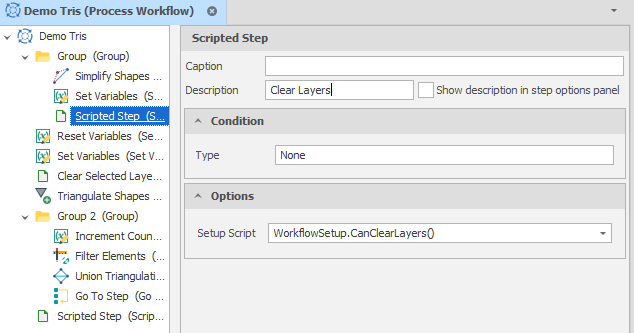
Caption
(Optional) Enter a Caption. The Caption replaces the display text for a given step in the Workflow Runner.
Description
(Optional) Enter a description that summarises the action performed by the step.
When running a step, the description is shown together with a completion message.
This appears on the row and, if an error occurred, in the Error List.
Show description in step options panel
Select this option to show the Description in the Step Options dock panel (when this step is selected in the Workflow Runner panel).

Condition -
Type
Select a (None, Expression, Script) Condition Type.
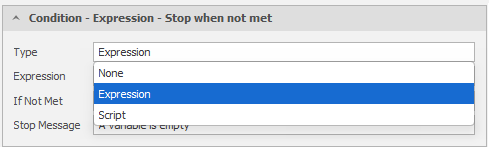
Condition - Expression - Stop/Skip when not met
When the Condition Type is Expression, click to use the drop-down to build a filter expression in the Expression Editor. Filter Expressions evaluate and return a Boolean (True or False) value.
If the expression returns a False value, the condition is NOT MET.
Condition - Script - Stop/Skip when not met
When the Condition Type is Script, click to use the drop-down to select a Script Method.
Stop Message
When the condition is NOT MET and you have chosen to Stop running the workflow, the message that is displayed to the user should indicate the reason why the workflow was stopped (based on the condition set).
Options
A Process Workflow can be built by a script and a script method that creates the workflow's steps. The script is selected as a setup script in the Workflow Runner.
A script may also be added to a Process Workflow through a Scripted Step, or through a step which has been given a Run Condition of type "Script".
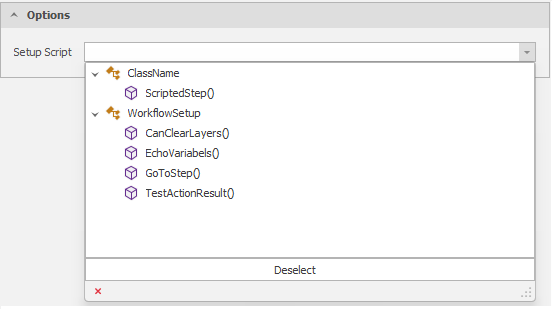
Setup Script
Use the drop-down to select the scripted method provided in a Setup Script.
For an overview of how to create workflows or workflow steps through scripting, including animated examples and sample code, see: Workflows Scripting