

Process Workflows
Process Workflows provide the capability to perform repeatable actions across design and scheduling workflows. The steps in a process workflow can be manually configured, recorded, scripted, or any combination of the three.
Some workflows can be run over multiple sessions, their states can still be saved with the project so a half completed workflow will still be at the same state after reopening a project. This can be great for the auditability of a process between sessions, so the user knows exactly where they are up to. Persistence is up to the implementer of the workflow and can be as complex or as simple as they like.
To improve team productivity and provide standardisation and consistency across projects, process workflows can be exported and imported.
Note that any workflow progress is saved in the project, so exporting to a new project will forfeit progress.
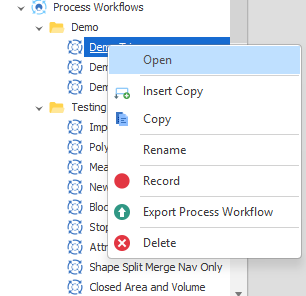
To open a Process Workflow, in the Project Explorer, right-click on the name of a Process Workflow and select Open from the context menu.
To create a Process Workflow, in the Project Explorer, right-click on the Process Workflows node and select Add > New Process Workflow.
You can setup process workflows in the Workflow Setup panel and then run them in the Workflow Runner dock panel.