

Recording when someone is on leave
People may be absent because they are off-site or on leave . Their 'off-site location' can be recorded in the Locations tab of the Person Allocation window.
- Click on the Person Allocation button on the main toolbar.
- Make sure the Locations tab is selected in the Person Allocation window.
- Select a Person from the People pane.
You do not need to select a role if someone is off-site or on leave.
- Drag and drop the person's name onto the appropriate Location row.
The person allocation will be displayed for that location:
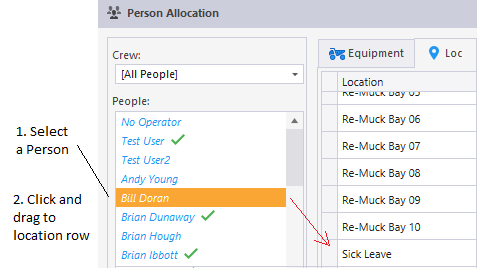
It is possible to allocate more than one person to a location.
If the person you are allocating is already assigned to another location, he or she will no longer be allocated to that location.