

Drill Holes
This
 Drill Holes
Pitram version 17.0 replaces the paper drill plan for underground long-hole drilling with a fully digital workflow.
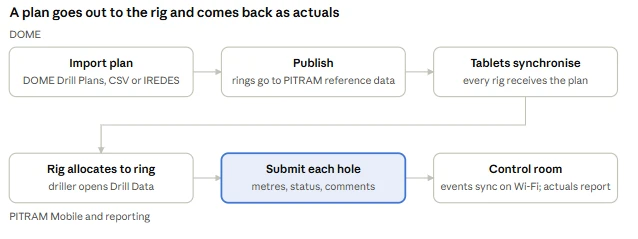
The drill and blast engineer imports the drill plan into Pitram Portal and publishes it. The driller sees the planned holes for each ring on the Pitram Mobile tablet in the cabin and records what was actually drilled. The results come back to the control room and into reporting. Plans are attached to rings, not to individual rigs or tablets. Any rig working on a ring sees its plan, so swapping a rig mid-shift needs no help from engineering.
For more information, see Drill Data.
Drill Plan Importer
As part of the new digital drillhole workflow in Pitram 17.0, drill plans are imported into the Drill and Blast module using the Data Importer.
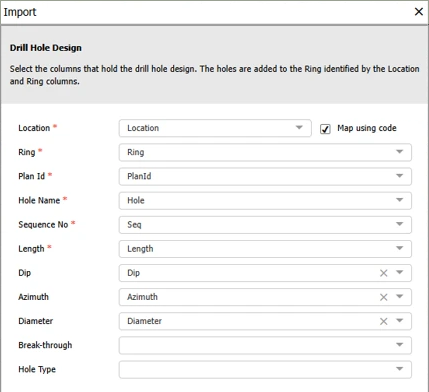
The importer accepts CSV files, and IREDES drill plan files that follow the Micromine Origin & Beyond format. Each plan is identified by its Plan ID. It holds the designed holes for one or more rings: name, sequence, length, dip, azimuth, diameter, breakthrough and hole type. For IREDES files, hole length, dip and azimuth are calculated from the collar and toe positions.
For more information, see Importing Drill Data.
Drill Plans Screen
A new Drill Plans tab in the Drill and Blast module lists the imported plans with their locations, ring and hole counts, total designed length and status. Plans can be filtered by period, Plan ID, location and status. Selecting a plan shows its designed holes, grouped by ring.
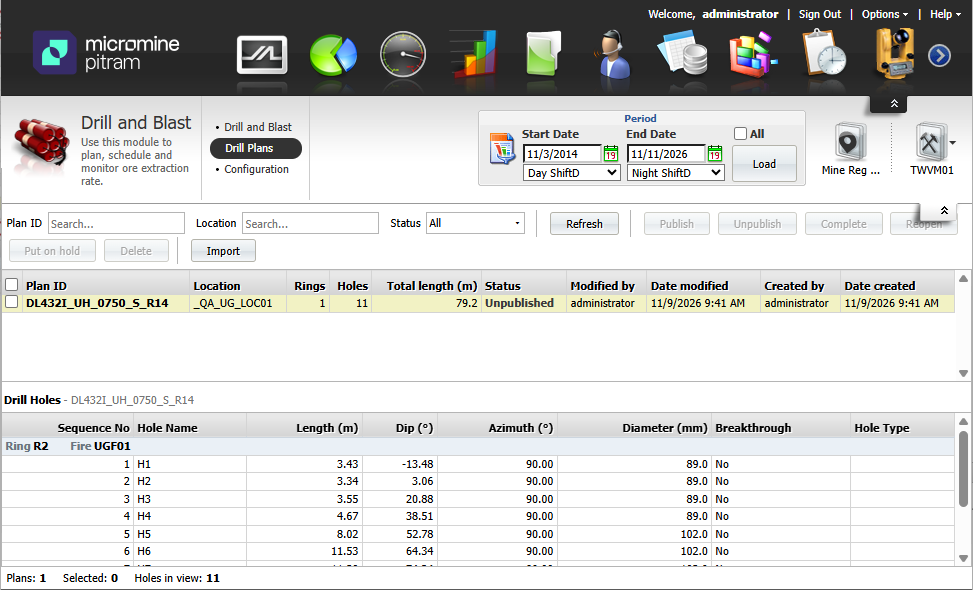
Each plan moves through a simple lifecycle: Unpublished, Published, On hold and Complete. Publishing a plan sends its rings to the Pitram Mobile tablets. Unpublishing it, or marking it Complete, takes them off again, and completed plans are kept for the record.
For more information, see Managing Drill Data.
Drill Hole Capture on Pitram Mobile
When a drill rig is allocated to a ring with a published plan, the driller opens the new Drill Data screen on Pitram Mobile. Each hole appears as a tile showing metres drilled against metres planned, coloured by its state: not started, incomplete, complete or abandoned. Opening a hole shows the planned values next to the actual values the driller enters. Drillers can add preset or free-text comments and set the hole status.
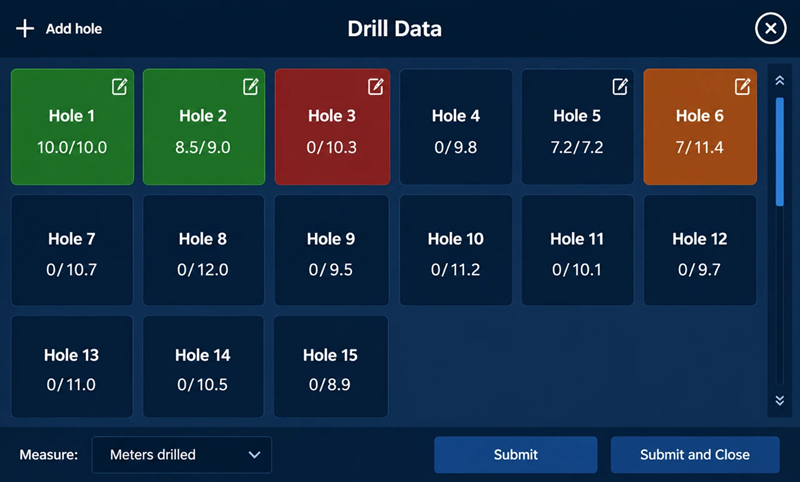
Everything works offline at the face, and the submitted holes are sent to the server once the tablet reaches the network. Redrilled holes, and extra holes approved on the spot, can be added directly on the tablet. Progress stays on the tablet across shifts, so the next crew sees what has already been drilled.
For more information, see Publishing Drill Data.
Mobile Keyboard Entry
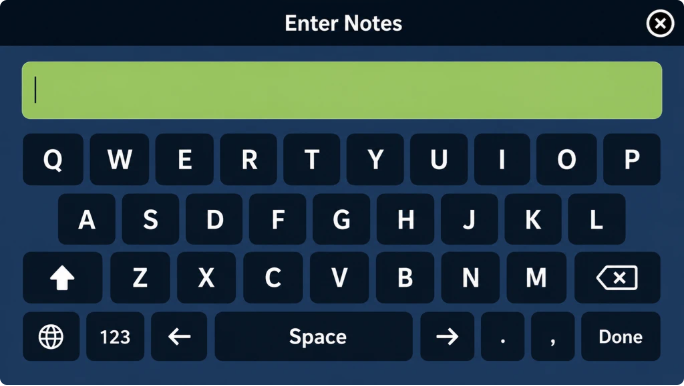
An input keyboard has been implemented for the Drill Data screen in Micromine Pitram Mobile to support the free text entry of notes on drillhole data.
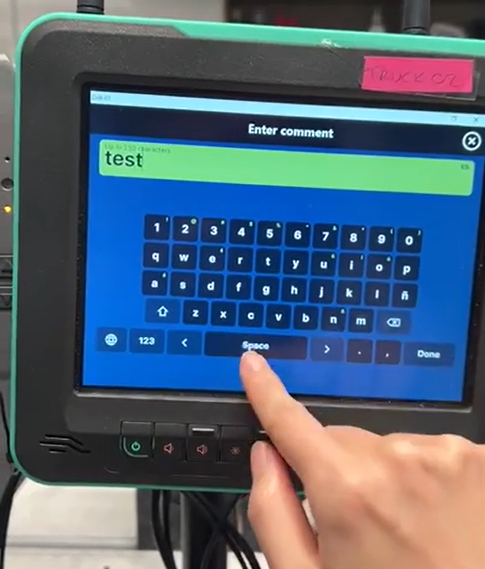
The keyboard is enabled with a new Reference Data group; namely UserInputProfile. Attributes for the new group consist of KeyboardLanguages, DefaultKeyboardLanguage and KeyboardDisplayNumericRow. The new group is registered on the MobileUserInterfaceProfile and defines the selected and default language for the keyboard (en, es, ru, mn, tr, id, el supported) and whether the keyboard shows a top numbers row by default.
Up to 250 characters can be entered in the Enter Notes field and saved to the drillhole data, and a messager will be displayed if the limit is reached.
Keyboard input of comments is only supported with Drillhole data. Consult your Micromine Pitram Administrator if you require configuration of the new keyboard input feature.
Drill Holes in Reporting
Captured holes flow into the Pitram reporting database alongside data from the existing drill guidance systems. A new drill hole actuals report compares planned and actual values for each hole by shift, location and ring, and includes hole status and comments.
Displayed in the report for each hole is the following:
| Column | Content |
|---|---|
| Plan ID, Location, Ring, Hole | Where the hole is. Location is the ring's parent location. |
| Status | Not started, Incomplete, Complete or Abandoned, as last set on the tablet. |
| Completed | Time of day the hole was last submitted as Complete; blank otherwise. |
| Ad Hoc | Yes for a hole added on the tablet (extra hole or redrill). |
| Planned and actual per parameter | Length, Dip, Azimuth, Diameter and Breakthrough side by side. The column captions are the labels from the site's parameter reference data, so they match the tablet. Actual length is the metres drilled, summed from the measure events in the shift, net of any downward corrections. |
| Hole type | From the plan; never has an actual. |
| Comment | The hole's comments as last submitted, joined with a vertical bar (for example Void at 6 m | Water inflow). |
A ring completeness summary shows how many of the planned holes are complete, abandoned, incomplete or not yet started.Holes can be added with these values definable from the Drill Data screen, and you can copy the plan details to actual using a dedicated button in the Hole screen.
For more information, see Reporting Drill Data.