

Pitram Mobile on Android
This
 Mobile
Pitram Mobile for Android
Micromine Pitram version 17.0 brings Pitram Mobile to Android tablets.
The operator interface has been rebuilt on the cross-platform Avalonia framework, so the same application now runs on both Windows® and Android. With this release, all sites move to the new interface, and the previous Windows® (WPF) client is retired. Peer to peer data transfer also works on Android, through Android versions of the Ad Hoc Network Service and Postman. Tablets can therefore keep collecting and delivering data out of network coverage, as Windows® units do today, and they use a registered site network in preference to a peer to peer connection whenever one is available.
On Android, Pitram Mobile can share the tablet with other applications, such as a vehicle's situational awareness or collision avoidance system. While another application is in the foreground, Pitram Mobile shows a small floating button on top of it. Operators tap it to switch back to Pitram Mobile, or to open a launcher menu that runs selected Pitram Mobile actions without leaving the other application. This builds on the external application support that already exists in Pitram Mobile on Windows.
The Android applications update themselves silently from the Pitram server and restart automatically. They get the update either directly from the server or from each other over peer to peer. Device management, such as Microsoft Intune, can be used to deploy the applications and grant their permissions centrally, but it is not required.
To support the configuration of Mobile for Android, the MobileLauncherButtons and MobileLauncherProfile attributes have been added to the Reference Data.
For more information, see Mobile for Android.
Integration
PLM2 Profile Event Generation
The PML2 Profile has been extended to support the optional generation of swings, cycles and auxiliary events.
The new functionality is enabled with the addition of toggle options in the profile reference data:
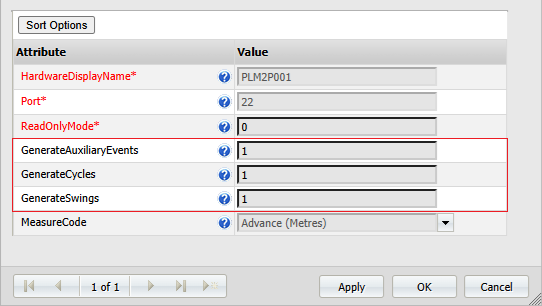
The new options enable/disable the generation of events as follows:
-
GenerateSwings - The material movement loaded on equipment events
-
GenerateCycles - The record cycle status against equipment events for the loading and hauling cycles
-
GenerateAuxiliaryEvents - The summed measure and attribute events produced for the cycle*
*For a list of the auxiliary events (measures and attributes) generated when GenerateAuxiliaryEvents is enabled, see PLM2 Profile.
All three new options default to ON. Existing profiles will not be affectedby the upgrade. Turning a toggle option OFF stops only its corresponding events; payload dump events are always generated regardless. The active profile configuration is written to the device log on startup and whenever it changes. A note is also logged each time an event is skipped because its toggle is OFF.
For more information, see PLM Integration.