

UI Enhancements
This
 UI Enhancements
Shift Planner Task Dependencies
Many mining activities can only start once another has finished. Pitram version 17.0 makes these task dependencies easier to plan and to follow.
Dependencies can now be included when tasks are imported into Shift Planner from Excel, so repetitive plans with linked activities no longer have to be connected by hand.
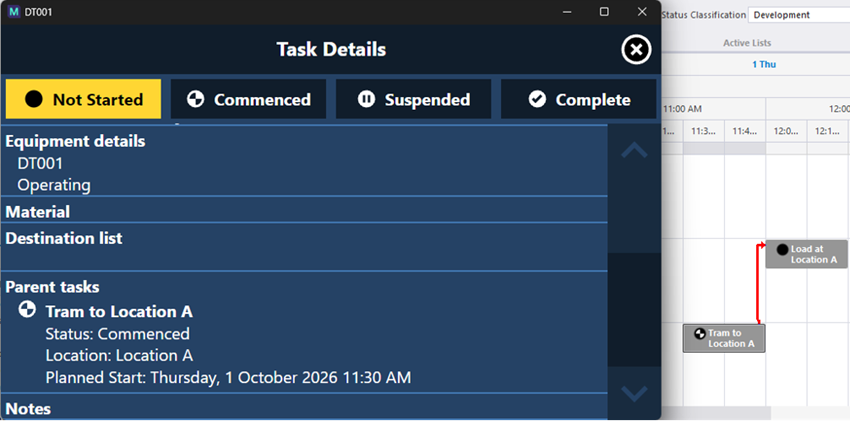
On Pitram Mobile, operators see a task's dependencies in the task menu, so they don't start a task before the work it depends on has taken place.
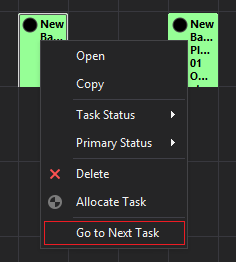
A new Go to next task button in Shift Planner takes the planner straight to the next task for the selected equipment or location, which makes it easier to stay oriented when planning ahead or zooming in and out.
For more information, see Shift Planner.
Data Acquisition Improvements
Data Acquisition includes a number of usability improvements requested by sites:
-
Panel definition wizards for the Loaders and Trucks, Multiple Loaders, Loader Performance, Equipment Timeline, Maintenance and Fuel Monitoring panels use clearer, more consistent titles and descriptions.
-
Panel filters now work consistently. A panel's location and status filters both limit what equipment the panel shows and what can be selected from it, so equipment no longer disappears from the panel it was just edited in.
-
Person allocation can be filtered by an active list of equipment and locations, which speeds up allocating crews at the start of the shift.
-
Sublocations can be shown in the Locations navigator, so measures and statuses can be recorded against them directly. In the shotcrete panel they are grouped and ordered under their parent location.
-
The Mobile Health panel now shows each unit's external IP address, so support staff can connect to units remotely even when the units sit behind a shared network switch.
For more information, see Data Acquisition.