

Drill Data
Pitram Mobile's Drill Data tool replaces the paper drill plan. An engineer imports the drill design into DOME and publishes it; the driller sees the ring's holes on the PITRAM Mobile tablet, records what was drilled against each hole, and the control room sees the result in a report once the tablet has synchronised. Three people take part:
-
Drill and blast engineer - Using DOME, Drill and Blast module, Drill Plans tab:
-
Imports the plan (CSV or IREDES), publishes it, completes or deletes it when the ring is done.
-
-
Driller - Using PITRAM Mobile on the rig tablet:
-
Allocates the rig to the ring, opens Drill Data, enters metres, status and comments per hole, submits.
-
-
Control room or supervisor - Using DOME Reporting:
-
Runs the drill-hole actuals report for a shift to see holes drilled, metres and ring completeness.
-
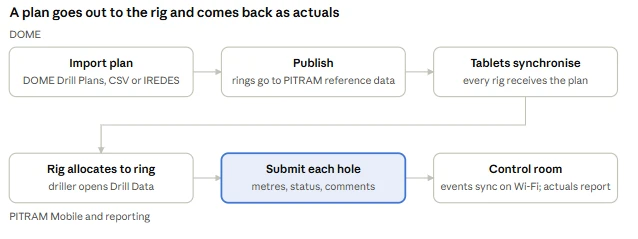
The flow has six steps. In the office before the shift: import the plan in DOME, publish it, and the tablets synchronise so every rig receives it. On the rig: the driller allocates the rig to the ring and opens Drill Data, submits each hole with metres, status and comments, and the events reach the control room when the tablet next reaches Wi-Fi, where the actuals report shows them.
For information on importing drillhole plans, see Importing Drill Data.