BelAZ Integration
Belaz haulage trucks (manufactured in Belarus) have been equipped with Advantech TREK 773 units running the Pitram Mobile software.
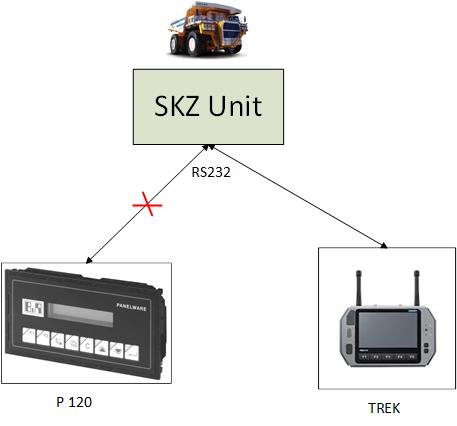
Information is sourced from the SKZ monitoring units on the trucks. Originally the SKZ units were connected to P120 display units using the RS-232 standard for serial communication, but these have been replaced with TREK units running Pitram Mobile and a P120 emulator.
Implementation
Pitram Mobile SKZ Connector
The Pitram Mobile SKZ Connector applies the communication logic developed for the P120 emulator and repeatedly polls data from the SKZ units. The following information is retrieved from the trucks:
- Payload (Tonnes)
- Fuel (Litres)
- Speed
- Truck Cycle Status
These data are processed and included in generated Pitram events. Information about the fuel, cycle status, loader passes (swings) and truck dumps are then displayed on the Pitram Mobile screens.
The SKZ units provide only raw values for the fuel. As a result of a moving truck, these values contain many variations and need to be smoothed before they can be displayed to the user. The solution provides configuration parameters that allow this smoothing algorithm to be optimised.
Speed readings from the SKZ units are used as an input to the smoothing algorithm in some cases.
The speed of a truck displayed in Pitram is not taken from the SKZ unit. GPS readings are used instead.
P120 also captures other values such as cycle ids or pressure. The current scope of the project does not include showing this information in Pitram Mobile. P120 handles only a subset of information available in the SKZ unit.
The polling frequency is configurable. The configuration is stored in Reference Data.
Events Generation
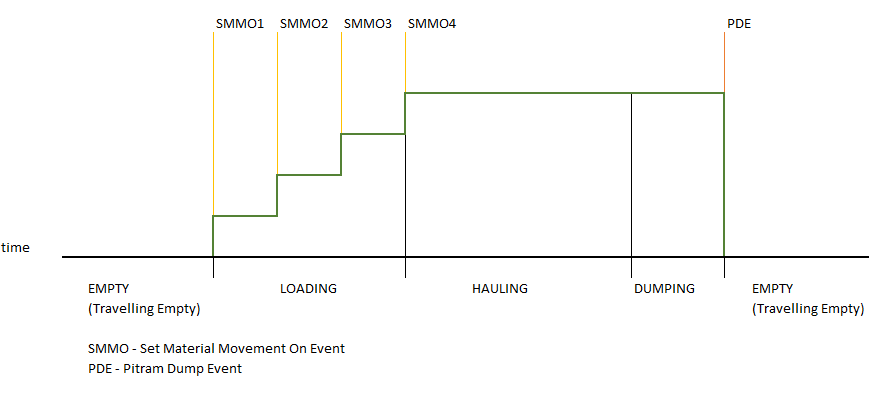
| Event Generation (see also the picture below). | |||||
| 1 | Cycle Status | One Pitram Event per Cycle Status Change. | |||
| This is driven by the change of the “mode” flag retrieved from the SKZ unit showing the values EMPTY, LOADING, HAILING, DUMPING. | |||||
| “Queuing at Loading” and “Queuing at Dump” are not be tracked. | |||||
| A change from HAULING to DUMPING is ignored. | |||||
| Mapping | |||||
| SKZ Mode flag From | SKZ Mode flag To | Pitram Cycle Status From | Pitram Cycle Status To | ||
| EMPTY | LOADING | Travelling Empty | Loading | ||
| LOADING | HAULING | Loading | Hauling | ||
| HAULING | DUMPING | - | - | ||
| DUMPING | EMPTY | Hauling | Travelling Empty | ||
| 2 | Set Material Movement On Event | One Set Material Movement On Event per swing. We do not know the exact moment the swing was completed, but we can infer it from the payload values (when it becomes stable). Pitram already supports generation of the swings (loader passes) based on the payload values from the consecutive payload events | |||
| 3 | Pitram Dump Event | The Pitram Dump Event is generated when the “mode” flag changes from DUMPING to EMPTY (end of dumping). | |||
| 4 | “Fuel Level Event” | The frequency of the event generation is driven by the change of the fuel relative to the tank capacity. If that change is equal or bigger than a threshold value, an event is generated. The threshold value is defined in %. For example, if the tank capacity is 2000 litres and the threshold is 1%, then any change by 20 (i.e. 1% of 2000) or more litres triggers a new event. | |||
| There is also an “extra” fuel level event generated at the same time as the DUMP and LOAD events. | |||||
| Given the current architecture, the system generates events for the fuel level (%) rather than litres of fuel. There is a configuration value for each equipment/equipment model defining the maximum tank volume. This allows easy conversion from litres to % and vice versa. | |||||
Swings Generation
The swings are identified as follows:
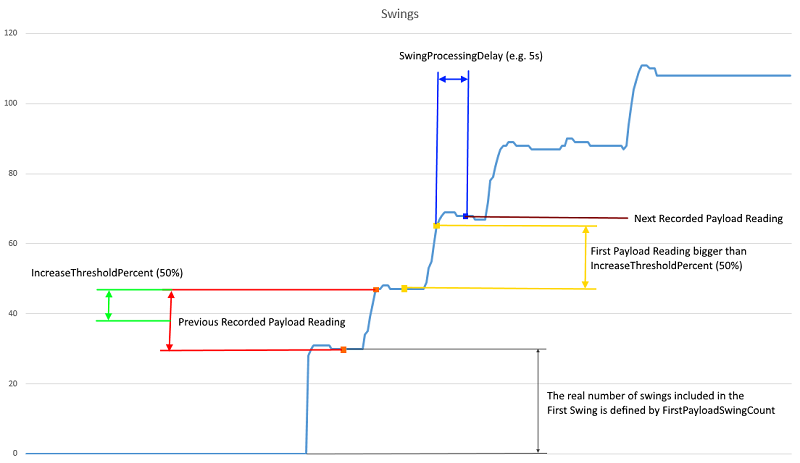
- Compare the Current Payload Reading from SKZ with the Previous Recorded Payload Reading.
- If the Current Payload Reading is bigger than IncreaseThresholdPercent * Previous Recorded Payload Reading / 100, then the Current Payload Reading is the First Payload Reading of the next swing.
- Wait for SwingProcessingDelay seconds. The first reading after this period is the Next Payload Reading (swing) to be recorded. This delay is used to reduce inaccuracies caused by the material settling on the truck.
Reference Data Parameters
The reference data to be configured are available in the SKZProfile.
- IncreaseThresholdPercent
- SwingProcessingDelay
- FirstPayloadSwingCount
The following screenshot explains the meaning of these parameters:
Event Source
- Events generated for data from the SKZ unit have a specific event source.
Smoothing of Fuel Values
Since the incoming fuel values from the SKZ units show big variations, they must be smoothed before they are displayed on the users’ screens.
The fuel level events already use the smoothed values (although there has been some discussion around whether the raw value should be used for the events and the smoothing only happens when the fuel is displayed).
Smoothing Algorithms
The system uses two types of Moving Average algorithm:
- Fuel Smoothing Simple Average
- Fuel Smoothing Weighted Average
Fuel Smoothing Simple Average
The unweighted mean of the previous n fuel readings. The value for n (see below “FuelSmoothingWindowSize”) is configurable in the SKZProfile in the reference data.
Reference Data Parameters:
- IsFuelSmoothingWeightedAverage = 0
- FuelSmoothingWindowSize = 250 (default)
The following examples show the impact of the smoothing window size on the smoothed fuel values:
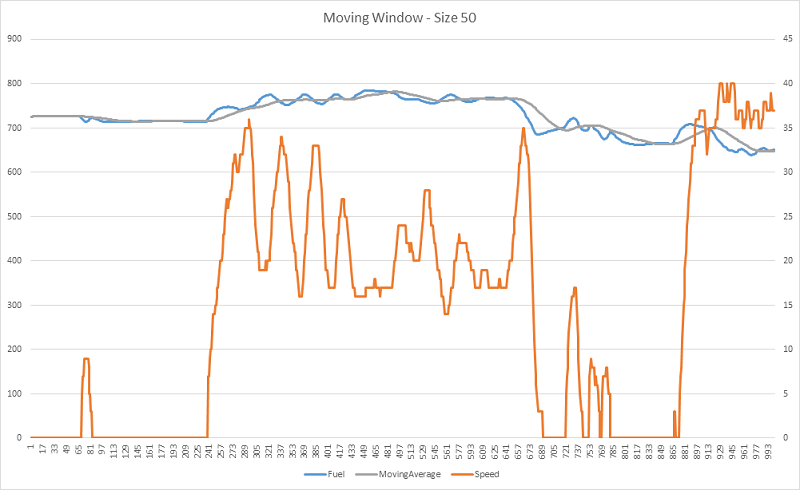
- FuelSmoothingWindowSize = 50
Smoothed values more or less correlates with the original fuel values.
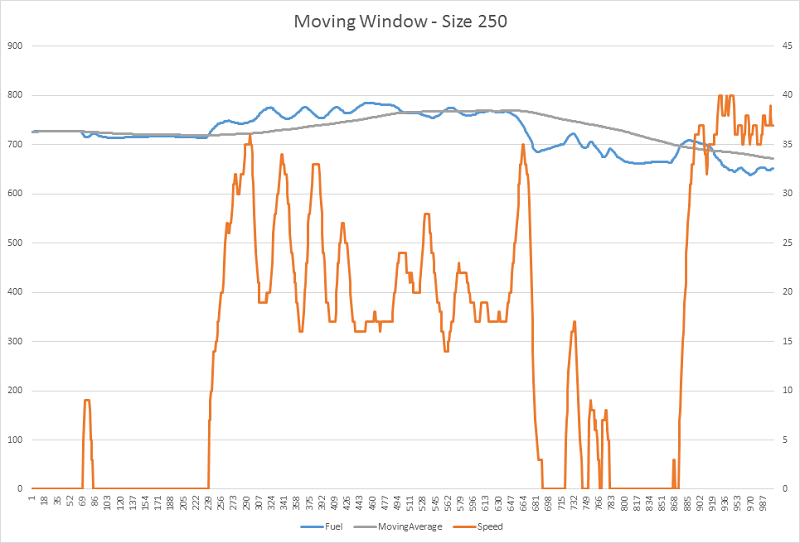
- FuelSmoothingWindowSize = 250
The smoothing curve is “straighter”, the trend is more realistic, but also more delayed.
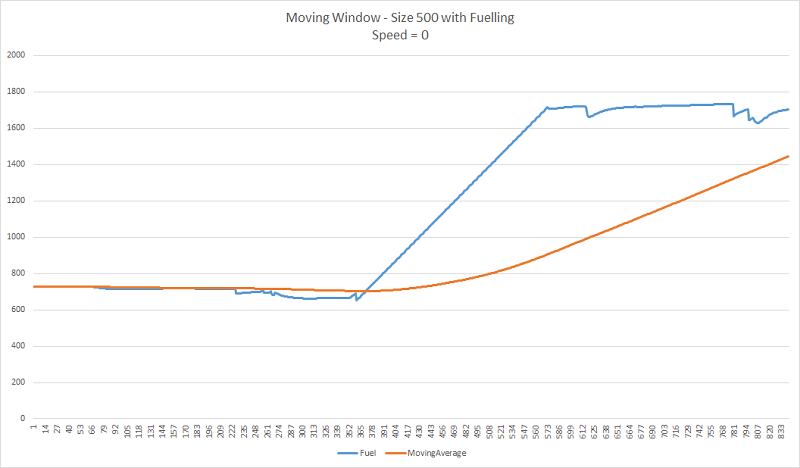
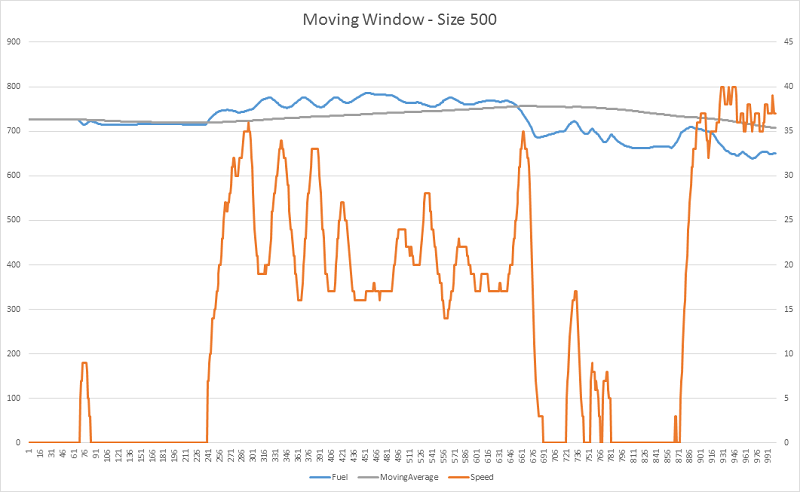
- FuelSmoothingWindowSize = 500
The smoothing curve is even “straighter”, the trend is probably more realistic, but even more delayed.
Fuel Smoothing Weighted Average
An average that has multiplying factors (see below the weight of the readings) to give different weights to fuel readings at different positions in the sample window.
Here the thinking is based on the observation that the fuel values are more stable around the time when the speed is 0 and more unstable when the truck is moving. This means the readings where speed = 0 have bigger weight than the readings where the speed > 0.
weight of the readings = 1 in case the truck speed = 0 (see the reference data parameter StoppedWeightedAverage below).
weight of the readings < 1 and > 0 in case the truck speed > 0 (see the reference data parameter MovingWeightedAverage below).
Uphill and downhill movements as well as the loading and dumping of a truck is not considered for the weights.
Reference Data Parameters:
- IsFuelSmoothingWeightedAverage = 1
- FuelSmoothingWindowSize = 250 (default)
- MovingWeightedAverage = 0.2 (recommended value)
- StoppedWeightedAverage = 1 (recommended value)
The following examples show the impact of the smoothing window size on the smoothed fuel values:
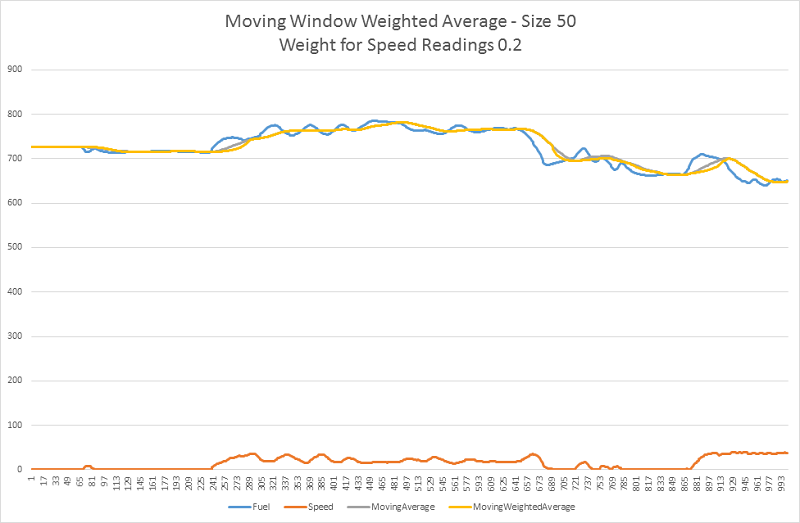
- FuelSmoothingWindowSize = 50, MovingWeightedAverage = 0.2, StoppedWeightedAverage = 1
The smoothed values more or less correlates with the original fuel values.
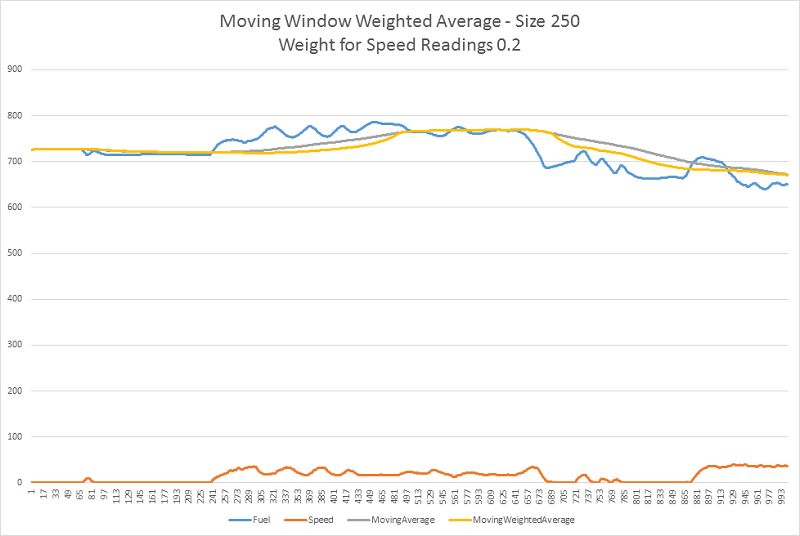
- FuelSmoothingWindowSize = 250, MovingWeightedAverage = 0.2, StoppedWeightedAverage = 1
Now the weighted average curve (yellow) is more “attracted” by the values with the higher weight – i.e. when speed = 0.
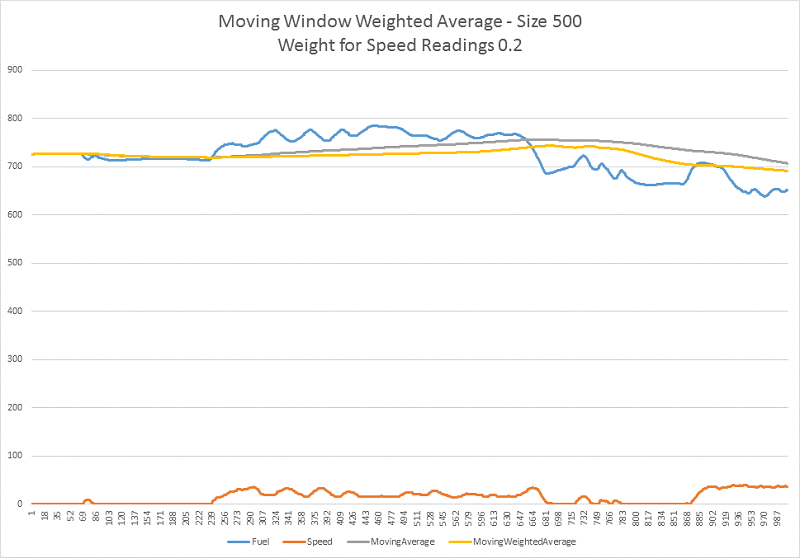
- FuelSmoothingWindowSize = 500, MovingWeightedAverage = 0.2, StoppedWeightedAverage = 1
The weighted average curve (yellow) even more “attracted” by the values with the higher weight – i.e. speed = 0
Fuel Smoothing Ignoring Readings with Speed > 0
Another option how to configure the fuel smoothing algorithm is to completely ignore all of the readings where the equipment speed > 0. This is based on the assumption that the fuel readings of a not moving truck are giving the most accurate values.
Reference Data Parameters:
- IsFuelSmoothingWeightedAverage = 0
- IgnoreMovingFuelReadings = 1
- FuelSmoothingWindowSize = 250 (default)
The parameters used for the weighted average can be ignored as the weights would not have any impact on the calculated values if only the readings with speed = 0 are processed.
The following examples show the impact of the smoothing window size on the smoothed fuel values:
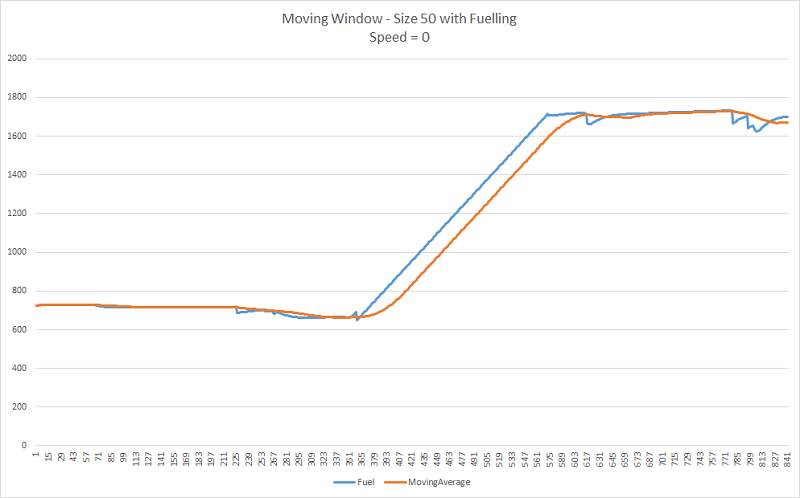
- FuelSmoothingWindowSize = 50
Apart from fuelling, the trend of the smoothed values is mostly decreasing (orange curve).
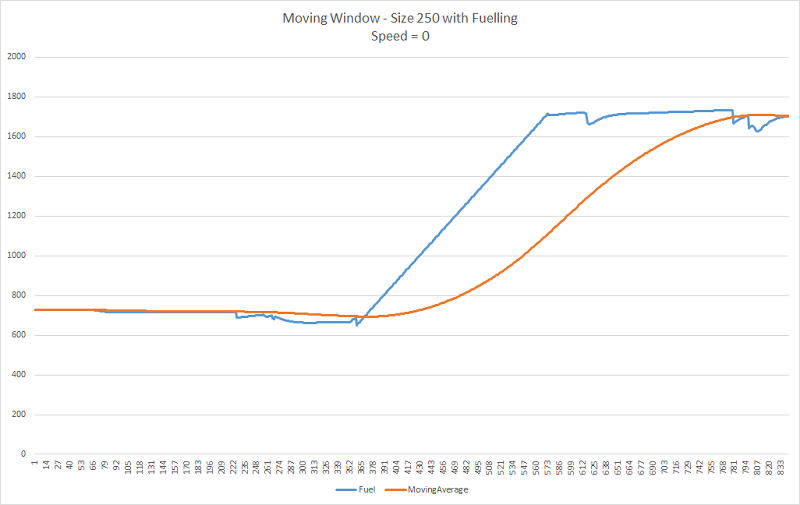
- FuelSmoothingWindowSize = 250
Apart from fuelling, the trend of the smoothed values is mostly decreasing (orange curve), but also more delayed
- FuelSmoothingWindowSize = 500
Apart from fuelling, the trend of the smoothed values is expected to be decreasing (orange curve) even more consistently, but also more delayed.