

Add Shift Comments
To add comments to a shift, select the View | Comments menu option in Data Acquisition or Event Editor, or click the Comments button in the toolbar.
In the Comments panel that opens, in the column at the left,
- Click the Add button to open the list of shifts.
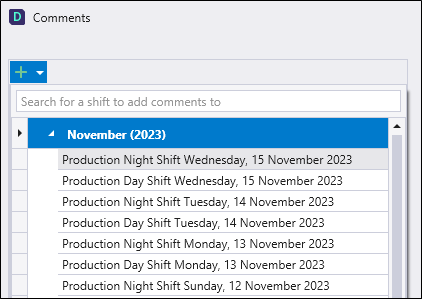
You can search for a shift to add a comment to using the Search field provided, or
-
Use the list to select the relevant shift to which to add a comment.
-
Enter the relevant comment In the Comment field at the bottom right.
Note: The Comment field has a character limit of 1024. As text is entered, a message is displayed when the character count approaches the limit.

Once the character limit is reached, the message will change to an alert and no further text can be entered.

-
Select a Priority for the comment from the drop down.
-
Enter a Category for the comment from the drop down
Note: Available categories are determined by entries in the CommentCategory table in the Pitram Server Database. If you require additional categories, consult your Pitram Administrator.
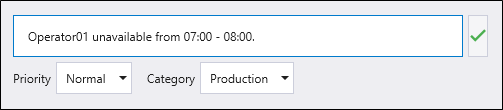
When the comment is entered and configured as required,
-
Click the green check button at the right of the Comment field.
The comment is saved, and displayed for the Shift in the list at the left.
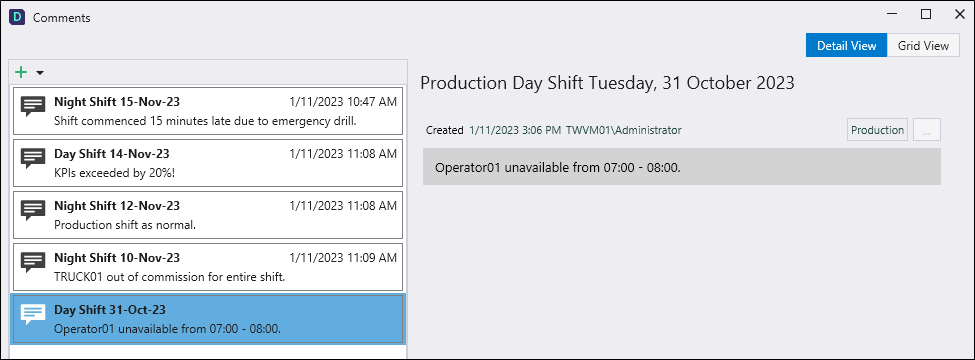
Additional comments can be added to the shift by selecting it from the shift list at the left and repeating the procedure previously outlined.
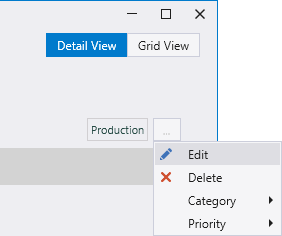
Comments can be edited using the Edit option in the More menu for each comment.
If you place the Comments panel in Grid View using the button at the top right, you can make changes to comments directly in the cells. Comments cannot be deleted from Grid View. Return to Details View to delete comments.
To delete a comment,
-
Select the Shift for the comment in the panel at the left.
-
Select the comment to be deleted from the list at the right.
-
Click Delete in the More menu.
The SY3: Shift Comments System report can be run to display information on the details for a range of Shift comments.