

Requesting Logs from Mobile
Options for requesting additional data such as log and video files in a Mobile Health Panel allow an operator to collect and analyse a wide range of information from equipment.
For each equipment unit in Mobile Health Panel, it is possible to request logs and videos by clicking on the green down arrow in the Equipment column:
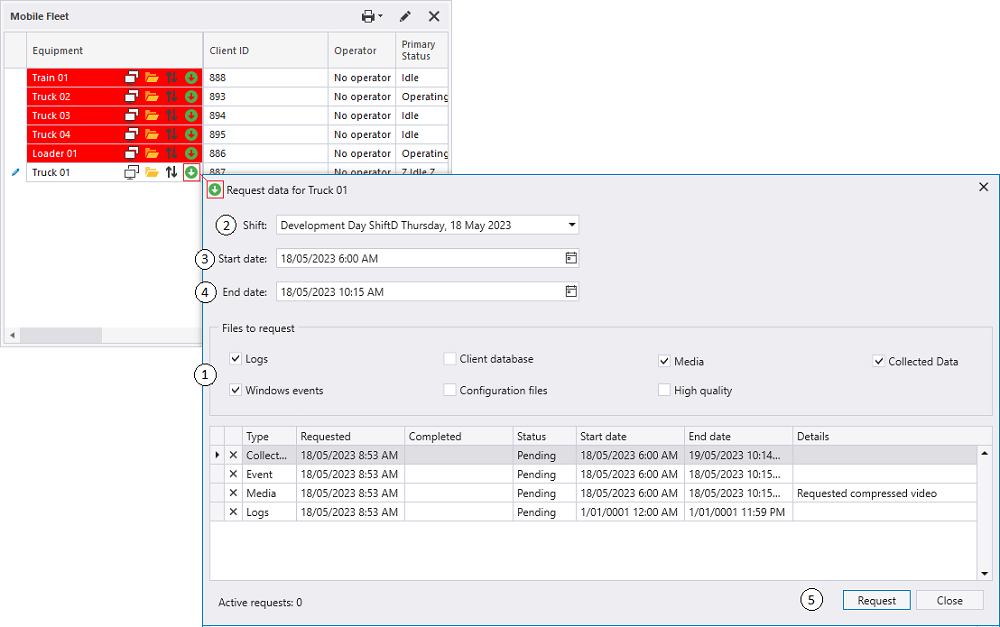
The Request Data dialog provides options to specify the type of data to be downloaded.
-
Currently it is possible to request (#1):
-
Logs
-
Windows Events
-
Client Database
-
Configuration files
-
Media (optionally in High Quality)
-
Collected Data (the requested data will be automatically zipped for transfer)
-
- Users can define a period to request. If a user selects a Shift from the drop down (#2), the Start date (#3) and End date (#4) will be populated based on the shift definition.
- Users can set the start date (#3) and end date (#4) directly. The selected shift value in the drop down will be reset.
The grid shows the history of all requests. Every record contains information about the request type, creation and completion date, status and additional data. It is possible to cancel a request in Pending or Transferring status.
After clicking on the Request button (#5) a request is sent to the server (General Server Service). A new record in Pending status will be added at the top of the grid.
The dialog can be closed by clicking on the Close (#6) button.