

Attribute Sets and Attributes
The types of files that the users of your tenant interact with will depend on the kind of business you perform. You will have planned for the attribute sets required, and their corresponding attributes when you completed the process outlined in Setting up the Tenant.
Attribute Sets and their Attributes are configured globally and selected at the workspace level. When you upload a file, the option to select its attribute set and set its attribute values is provided.
The following sections contain information on creating Attribute Sets and Attributes in Nexus Workspaces.
Attribute Sets
Micromine Nexus Workspaces allows you to work with a default set of attribute sets, for example, Micromine formats including Data, String, Annotation and Wireframe files, Image formats, CAD formats, PDF and Word documents, etc. To facilitate the implementation of your business processes, you can also create "custom" attribute sets.
Attribute Sets are configured globally and selected as part of the settings of a workspace. The default Attribute Sets list is displayed on the Administration | Attribute Sets page.
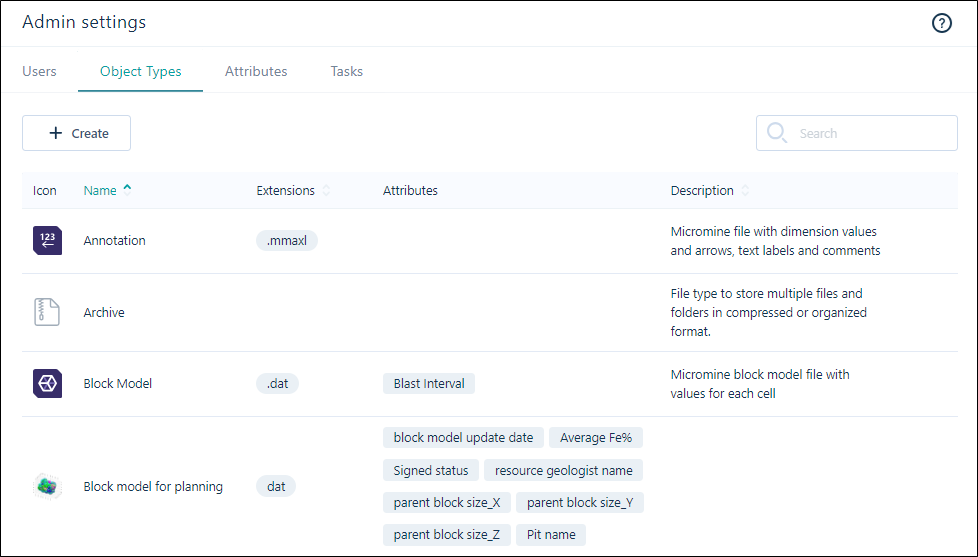
Information on attribute sets is contained in Scope Your Requirements. For information on creating attribute sets for your tenant, see Create Attribute Sets.
Attributes
Attributes can be associated with one or more attribute sets or task types on your tenant - whether default types or custom. Attributes are configured globally from the Administration page. Examples of useful file attributes include custom drillhole name, Geologist names and regional codes.
Note that attributes are simply used to identify and manage the files and tasks in Nexus and should not be confused with the fields in the files you upload to Nexus.
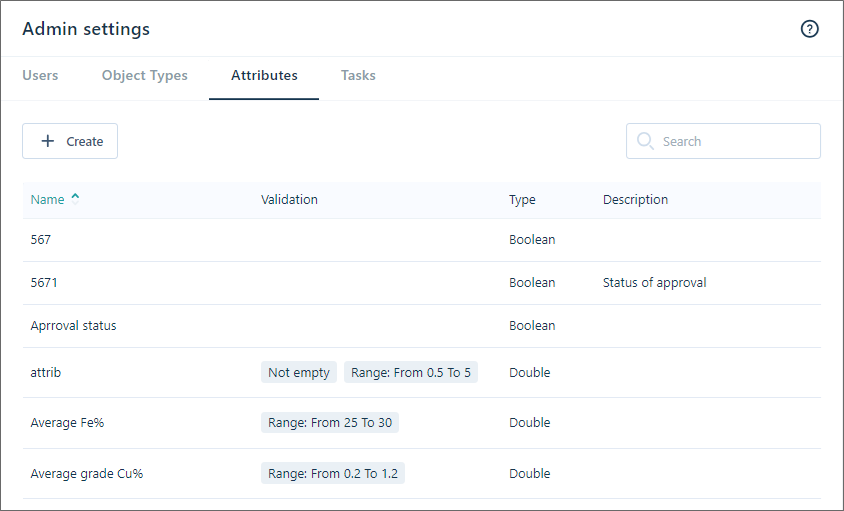
For information on creating Attributes for the attribute sets on your tenant, see Create Attributes.
Task Types
When you have created the necessary attribute sets and attributes for your tenant, it is recommended that you next create Task Types, Statuses and Priorities.