

Tips and Tricks
The following sections provide recommendations for Nexus Workspaces Administrators to help you get more out of our product. Also included are hints and tips for Nexus Workspaces Users and Guests and the answers to some FAQs.
The recommendations outlined within can be implemented as described, or incorporated as part of the overall strategy for setting up Nexus Workspaces for your own organisation.
Administrators, Users and Guests
There are currently three available security roles available in Nexus Workspaces: Admin, User and Guest.
| Role | Description |
|---|---|
|
User |
Manage the tasks, files, and attributes that you own and work with the tasks and files that are assigned to you. |
|
Admin |
Setup user accounts and groups, apply permissions, define tasks, attribute sets, attributes, and tasks. |
|
Guest |
The Guest role provides Read-Only permission to view Nexus for a limited time via invitation from an Administrator. |
Admin
A Nexus Workspaces Admin is not necessarily an IT specialist or an SQL database administrator. Nexus Workspaces can be set up and managed by any specialist in the organisation who understands the internal corporate structure and business processes.
Administrators have Read and Write permissions to the workspaces, projects and files in your tenancy. Your organisation may have several Admins within the Nexus Workspaces Tenant; all of them will have equal rights and permissions, so they should work cooperatively to avoid logical conflicts.
Administrators are responsible for creating Workspaces and Projects, as well as inviting Users and Guests to work in Nexus Workspaces.
See: Setting up the Tenant and Scope Your Requirements.
User
A Nexus Workspaces user is an invited member of your tenancy. Users can have Read and/or Write permissions to files in your tenancy, depending on permissions assigned to them by an Administrator.
If a User does not have permission for a workspace, they can request permission from an Admin using the Request permissions icon at the end of the Workspace row:
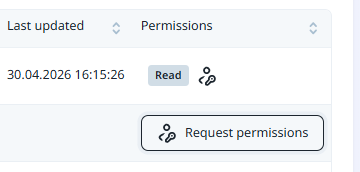
With restricted permissions, while the User can open a workspace they will not be able to edit the files in that workspace or upload new files.
See: Frequently Asked Questions
Guest
A Guest user is an invited external user who can be provided with access to Nexus Workspaces for a limited period of time with Read Only permission. The expiry date will be visible to the Guest user from their Personal settings.
Each Nexus Workspaces subscription tier has its own number of allowable guests. When a Guest is authorised, that Guest seat is tied to the email, so it cannot be reassigned.