

Setting up the Tenant
Your organisational account is called the Tenant. Users can be members of more than one tenant. For information on multiple tenant configuration, see Working with Multiple Tenants.
Inside each Tenant, you have one Workspace with nested entities: Projects, Library and Tasks*. These entities are initially empty. The Nexus Workspaces schema is almost empty at this stage. Administrators and various Users in your organisation will populate the application with your corporate data of projects, files and tasks.
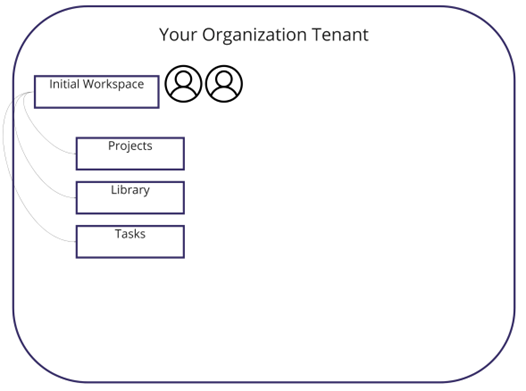
*These entities are presented in Enterprise and Business subscription tiers only.
When setting up a Nexus Workspaces Tenancy, each Administrator should perform these initial steps to prepare for usage of the Tenant throughout the organisation.
-
Create Workspaces
-
Set Permissions
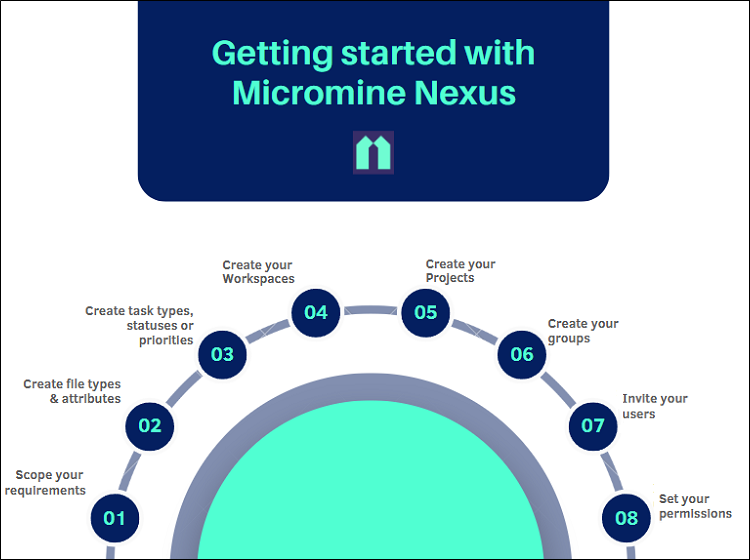
For further information on setting up Nexus Workspaces, Administrators should see Scope Your Requirements
For information on everyday use of Nexus Workspaces, see Frequently Asked Questions