

Admin
Greetings Nexus Administrators! This
-
Invite users
-
Create user groups
-
Grant permissions
-
Create attributes and validate attribute values
-
Create attribute sets and and associate them with attributes
-
Create tasks and associate them with attributes
-
Create one or more workspaces
-
Configure workspace library storage, project storage and upload files
-
Link Nexus projects to Micromine Origin & Beyond projects
Application Architecture
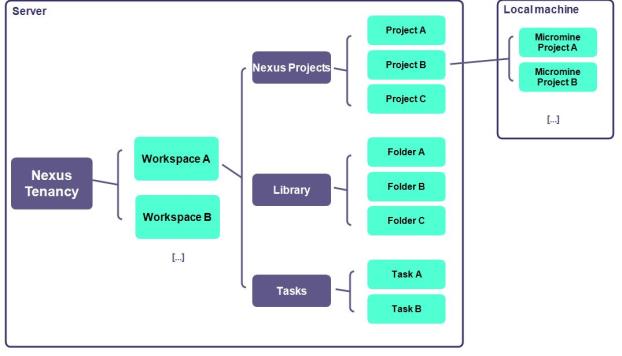
The Nexus application architecture is shown in the following diagram:
Tenancy
What you need to know about your Nexus "Tenancy"
-
Your corporate database, all files and metadata are stored at this level
-
Users and User groups are managed at this level
-
At least one Workspace is created at this level1
-
Workspace permissions are set at this level
-
Attribute Sets, Attributes and Tasks are configured at this level
-
Background Jobs (for Admin) are created, scheduled and run at this level
Workspace
What you need to know about the "Workspace"
-
A single workspace or multiple workspaces can be created1
-
Each workspace has its own Library storage
-
Object types, Attributes and Tasks are selected per workspace
-
Workspace permissions can be set for users and user groups
-
A workspace may contain one or more Projects1
Projects
What you need to know about a "Nexus project"
-
Projects inherit the Attribute Sets, Attributes and Tasks of the workspace
-
One Nexus project can be linked to multiple Micromine Origin & Beyond projects
-
Project storage is completely independent of workspace library storage
Tasks
What you need to know about tasks
-
Tasks are configured globally with their own attributes
-
Tasks are selected at the workspace level1
-
Files from either workspace library storage or project storage may be attached to tasks
Subscription and Deployment Options
For information about Nexus deployment options & subscription plans, click on the following links: