

Splash Screen
The Splash Screen shows the most recent projects accessed and provides a single location for creating or opening a project.
The Splash Screen is shown when opening the Gantt Scheduler directly (not by opening a project file) or after closing a project from the File menu.
User Interface
-
Recent Projects
-
Recent Projects right-click menu
-
New Project
-
Open Project
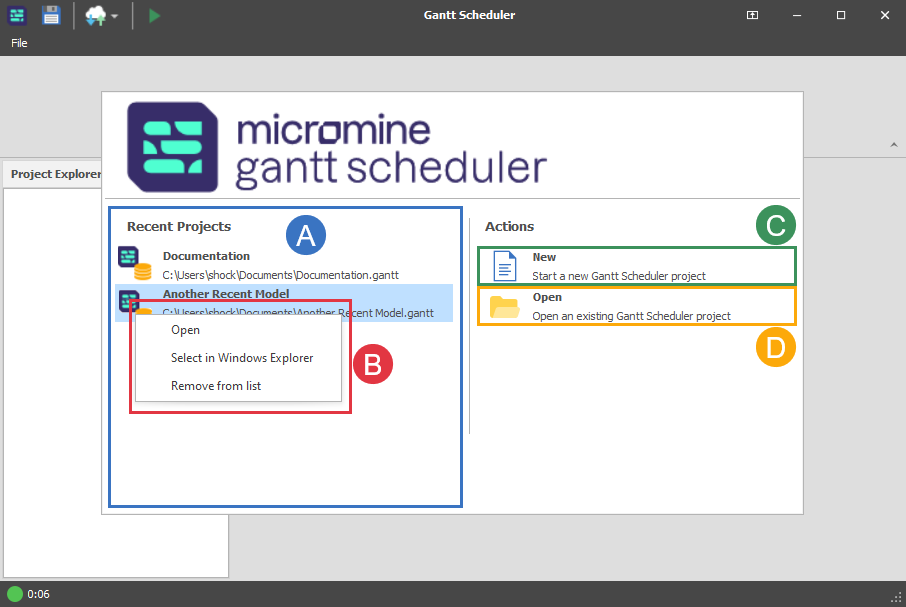
Recent Projects
The eight most recent projects will be available from this list in order (most recent) from top to bottom.
Recent Projects right-click menu
Open: Opens the project in Gantt Scheduler
Select in Windows Explorer: Opens Windows Explorer and selects the file in it's location
Remove from List: Removes the project from the Recent Projects list
New Project
Opens a file creation pop-up window.
After naming the new project, creates file project file and opens the project in Gantt Scheduler.
Open Project
Opens a file selection pop-up window.
After selecting the project, opens the project in Gantt Scheduler.