Active Lists
Active lists are the selection lists used by Pitram applications such as Data Acquisition and the Event Editor, or by Pitram Portal services such as Reporting, Drill and Blast and Grade Control. You can think of them as subsets of the records in a reference group table.
Drills, Dumps, Trucks, Loaders and Service Equipment active lists may be derived from the same Equipment table, for example.
In Data Acquisition, active lists can be used to identify which breakdown states apply to which equipment units, or which dump locations are valid for a particular source location, etc.
The name of the active list should give an indication of its contents.
Some examples are:
- Select a particular location from an active list of Underground Production Locations.
- Select a particular drill from the list of Development Drills.
- Select a new employee from the list of B Crew.
Active lists are configured in Reference Edit.
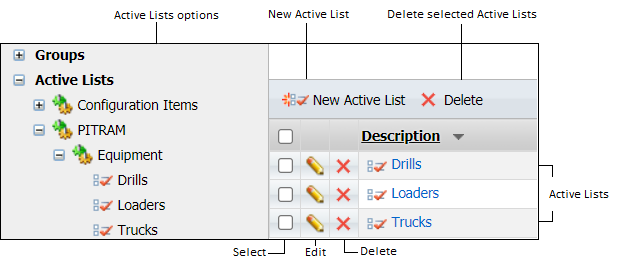
In the navigation pane you will find a group of Configuration Items. You can define the active lists that function as filters in the Equipment, Location and People panes of Data Acquisition.
The image below shows a tree structure for active lists, along with the form used to edit the list contents.
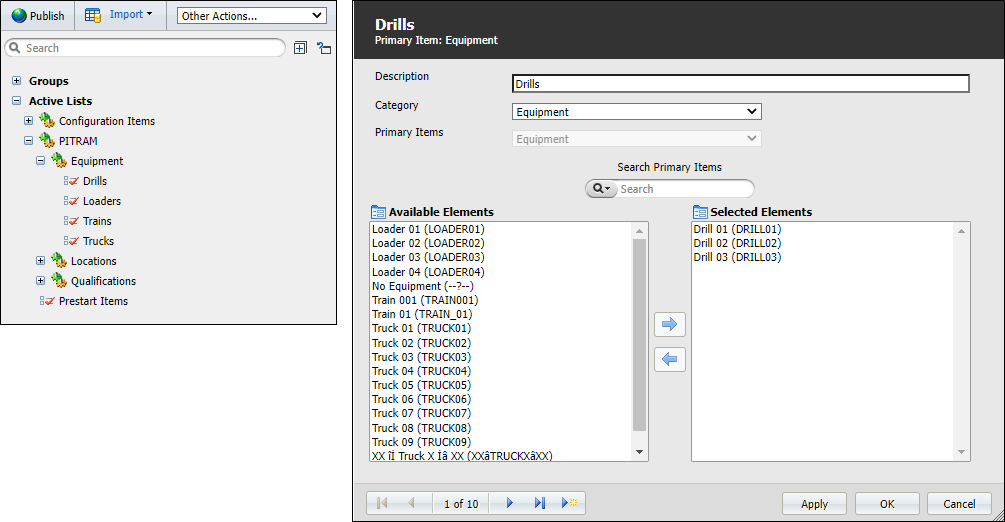
If you make any changes to the active lists, the changes must be Published to make them available to the rest of Micromine Pitram.
Search
The Search function operates as follows:
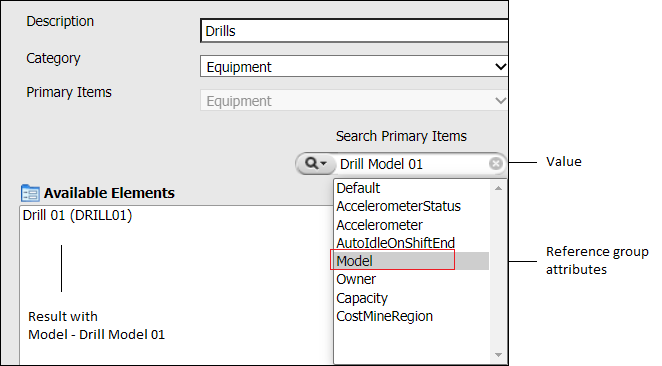
- Click on the Search icon. The attributes that are defined for the selected Primary Items are displayed.
- Select an attribute from the list. Only items that have a particular value for the selected attribute will be listed in Available Elements. For example, where Model = Drill Model 01.