

Location Import Setup
Attributes required to set up a (material) source location must be defined. Depending on the configuration, additional attributes may need to be set up.
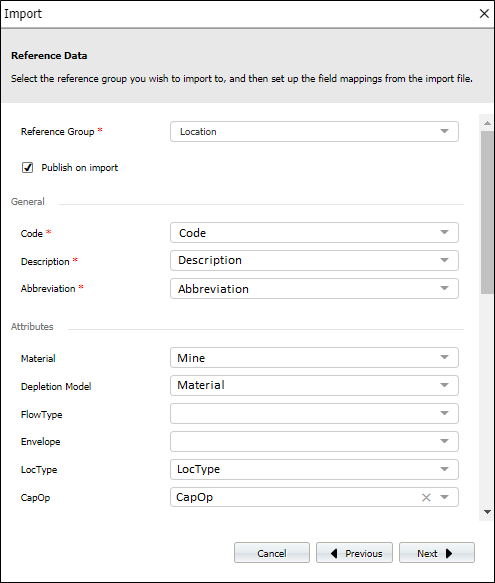
Mandatory attributes
| Attribute | Description |
|---|---|
| Depletion Model | Always “Weighted Average 100” use code “WA100” |
| Flow Type | Always “Primary” use code “PRI” |
| Material | Material at the location – use the appropriate code |
Optional attributes
| Attribute | Description |
|---|---|
| Draw | The estimated draw percent for the location – only used for reporting |
| Metal Recovery Factor | An estimate of the amount of product that will be recovered through processing – only used for reporting |
| Moisture | The moisture content of the material – can be used to convert wet mass to dry for product content calculations |
| SG | The SG of the material - can be used to convert volume to mass |
The importer will list all the attributes that have been configured for LOCATION, enforcing any mandatory fields.
To be imported, each LOCATION attribute must have a matching column in the CSV file. However, not all LOCATION attributes require a column in the CSV file. If the column is not present and the attribute is not mandatory, then the attribute will not be imported and will be shown as blank in the display.
Reimporting will require that all mandatory attributes are present. It is recommended that the original import file be retained and changes made to the locations and attributes as required.
Where the CSV column name matches the LOCATION attribute name, a mapping will be shown in the mapping panel. All mappings can be amended.