

Setup the Movidius Unit in the Trek Unit
- Go to Services (Windows Key + R, type “Services.msc”).
- Locate the PitramVision service and stop the service.
- Plug-in the Movidius calculation unit.
- Get the MovidiusDriver and install it using the following instructions:
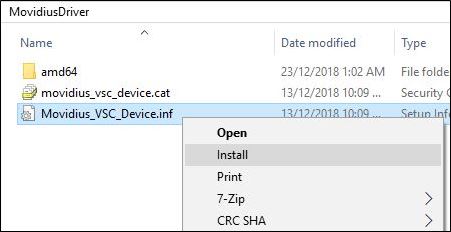
- Right-click on the file Movidius_VSC_Device.inf and click Install:
- Go to the Device Manager (Windows Key + R, and type ‘devmgmt.msc’ and press Enter).
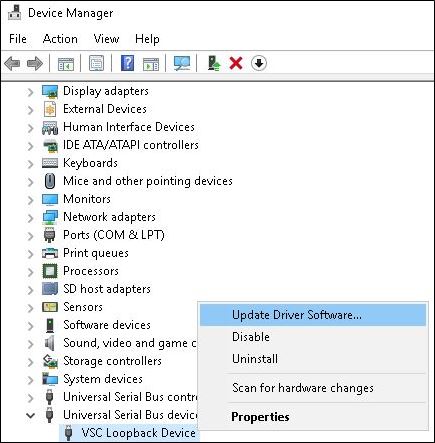
- Under Universal Serial Bus Devices, Find "Movidius MA2X5X" or "VSC Loopback Device":
- Right-click on the the device and click Update Driver Software:
- Select Browse my computer for driver software.
- Select Let me pick from a list of device drivers on my computer.
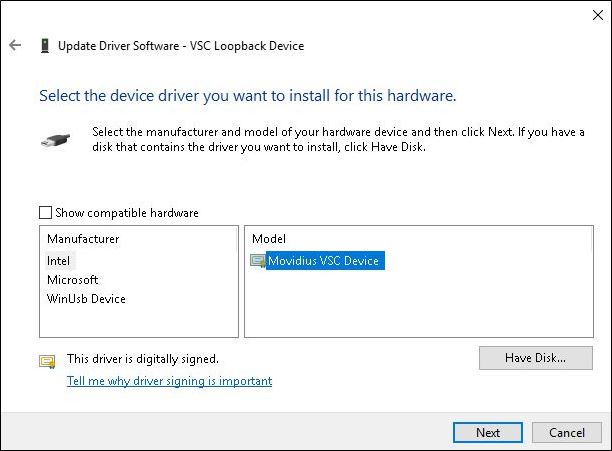
- Un-tick Show compatible hardware.
- In the left-hand column, select Intel.
- In the right-hand column, select Movidius VSC Device:
- Install.
- Restart.
Congratulations! Mobile setup is now complete.
Pitram Vision Reference Data Attributes
VisionCommonSettings Attributes
- HardwareDisplayName - Name of device to show in Mobile as the device name (displayed next to the camera icon and in Mobile diagnostics). It should be Pitram Vision in some form and language as it's displayed in Mobile UI.
- OperatingActiveList - ActiveList(States → Equipment states: Category:Equipment states, Primary Items: Status) with list of statuses in which PitramVision will operate. Note that if none is selected then PitramVision will operate in any state.
- PortNumber - Port number to be used by the service's communication host. Eg 827.
- ConnectionRestoredSeconds - Time in seconds to leave the Pitram Vision Connection Restored message on the screen before automatically dismissing. Set to 0 to display forever until user clicks the message or the close button.
VisionCameraSettings Attributes
- CameraType - type of the camera controller to use - USB, AxisM7011, TekdisIP or GenericIP. When using GenericIP, full camera connection string needs to be configured in "connection string". Any IP camera should work with GenericIP camera type, but if we want to use additional functionality (e.g. analogue camera connected to the encoder in AxisM7011) or want the service to build the connection string by itself (from IP address, username, password and FPS) specific camera type needs to be added to the service.
- ConnectionString:
- USB camera tem index (first camera in the system has always 0, second 1..)
- AxisM7011 or TekdisIP camera type - IP address only (and camera username, password and FPS configured separately - service builds connection string by itself) or full camera connection string (http://user:password@ip_address/mjpg/video.mjpg - no username, password or FPS need to be configured)
- GenericIP - full camera connection string (http://user:password@ip_address/mjpg/video.mjpg - no username, password or FPS need to be configured)
- Username - camera username, for all IP camera controller expect GenericIP
- Password - camera password, for all IP camera controller expect GenericIP
- FPS - camera FPS, for all IP camera controller expect GenericIP - connection string configures camera to run at set FPS
VisionDataCollectionSettings Attributes
- OutputPath - full path where images should be saved to.
- ArchiveType - container type into which images should be saved, currently supported: SQLite, Zip and Avi (video file).
- MaximumFileSize - maximum file size for each container file (in MB). After reaching Max File Size for a container, service creates a new container. The purpose of it is to make it easier to download the data from equipment when limited network bandwidth is available.
- ImageEncodingFormat - format into which all images will be encoded. Most of commonly used image formats are supported, e.g. ".jpg" and ".png".
- ImageWidth - images will be resized to this width (and proportional height) before saving.
- InferenceTriggered - enables inference triggered data collection
- MobileTriggered - enables Mobile triggered data collection. Mobile Triggered mode overwrites Inference Triggered Mode.
- TimeIntervalSeconds - time (seconds) how often frames will be saved (time triggered)
- MinimumFreeSpace - minimum free space (in MB) on the drive that should be left when collecting images.
VisionInferenceSettings Attributes
- ModelPath - full path to the model used for inference. Model consists of three files (.bin, .mapping, .xml) and the path should include file name, without any extension.
- Device - device used for prediction (Movidius or Myriad for Movidius computer stick or mini PCIe card, CPU).
- DeviceTemperatureLogging - if temperature of the device should be logged (true or false - default), currently only supports Movidius NCS1
- ModelUpdatesNetworkDirectory - network share path where service should be checking for new models.
- ModelCheckIntervalMinutes - how often (in minutes) the service should be checking for new models.
- MaximumFramesPerSecond - maximum number of predictions service can process per second (default 0 - unlimited). It supports floating point values, e.g. 0.5 for 1 frame per 2 seconds.
- DirtyWindscreenDetection – enables detection of dirty windscreen.
- ObstructedCameraLensDetection – enables detection of obstructed camera lens.
VisionTracingSettings Attributes
- TracingLevel - minimum level to be traced ("disabled" when tracing not required)
- TracingOutputPath:
- default - configures service to save files into the same directory as Mobile
- full path (e.g. C:\TraceFiles\) - trace files saved to the specified directory
- NumberOfDaysToKeepLogsFor - number of days logs should be kept for
- PredictionTracing:
- enabled - inference predictions are traced to the same file as all other tracing
- external - inference predictions are traced to a separate file
- disabled - inference predictions are not traced to file
- TracingFormat:
- txt - tracing saved as regular text files (.txt)
- csv - tracing saved into comma-separated files (.csv)
- DateTimeFormat:
- time - only time will be saved in text files (e.g. 10:21:08.6097)
- longdate - full date and time will be saved in text files (e.g. 2019-04-24 14:09:57.0636)
- or free format like: yyyy-MM-dd HH:mm:ss.fff - it can be formatted in any way and also contain extra text, e.g. "Day and month: dd/MM Time: HH:mm:ss.fff" will result in "Day and month: 24/04 Time: 14:09:57.0636" being logged as date and time.
VisionUpdateSettings Attributes
- LocalUpdatesDirectory - full path where update files should be saved to.
- NetworkUpdatesDirectory - network share path which service should be checking for new packages.
- UpdateCheckIntervalMinutes - how often (in minutes) the service should be checking for new packages.
AutoCycleStatusSettings Attributes
- MinimumLoadingConfidence - The minimum confidence for the loading PV state in percents
- MinimumDumpingConfidence - The minimum confidence for the dumping PV state in percents
- MinimumDumpToTruckConfidence - The minimum confidence for the dumping to truck PV state in percents
- MinimumMovingConfidence - The minimum confidence for loaded or empty PV state in percents
- LoadingConfidenceDuration - The minimum confidence duration in seconds to ensure we are in the reported by Pitram Vision loading state
- MovingConfidenceDuration - The minimum confidence duration in seconds to ensure we are in the reported by Pitram Vision loaded or empty state
- DumpingConfidenceDuration - The minimum confidence duration in seconds to ensure we are in the reported by Pitram Vision dumping state
- DumpToTruckConfidenceDuration - The minimum confidence duration in seconds to ensure we are in the reported by Pitram Vision dumping to truck state
- LoadedInMovementPercentage - The percentage of loaded state in movement to threat movement like loaded state
- IgnoreOppositeStateDuration - Time in seconds to ignore opposite PV state (Loading after Dumping and v.v.)
- RefuseImproperStateDuration - Time in seconds to refuse improper PV state (Loading after Loaded and etc.)
- MinimumDirtyConfidence - The minimum confidence for DirtyOrOutOfFocus PV state in percents
- DirtyConfidenceDuration - The minimum confidence duration in seconds to ensure we are in the reported by Pitram Vision DirtyOrOutOfFocus state
- MinimumSideViewConfidence - The minimum confidence for DoorOrSideView PV state in percents
- SideViewConfidenceDuration - The minimum confidence duration in seconds to ensure we are in the reported by Pitram Vision DoorOrSideView state
- MinimumDarkConfidence - The minimum confidence for TooDarkOrTooBright PV state in percents
- DarkConfidenceDuration - The minimum confidence duration in seconds to ensure we are in the reported by Pitram Vision TooDarkOrTooBright state
- DefaultDumpMeasure - The measure code used only in the event of the GenerateDump being ON and a missing payload value received
- UnknownDumpLocation - Generate dumps against this location if the actual dump location cannot be determined or is unknown. This attribute only applies to dumps generated by automated movements
- MaximumRadiusForDumpToTruck - Maximum distance to search trucks to dump in meters) (was MaximumTruckToDumpDistance)
- OperateWhenLoggedOff - Defines flag that PV will work when operator is logged off
- DumpsInNonOperatingStatus - if enabled, ACSC will keep working if primary status is not in OperatingActiveList, but the dumps will be submitted at UnknownDumpLocation instead of location derived from the waypoint logic.
- LastWaypointDuration - The duration in seconds to use last passed waypoint to run waypoint rules for loading and dumping. ("-1" - off)