

In-Cab Validation Profile
The InCabValidationProfile is used to configure the validation parameters applicable to Micromine Pitram In-Cab Validation.
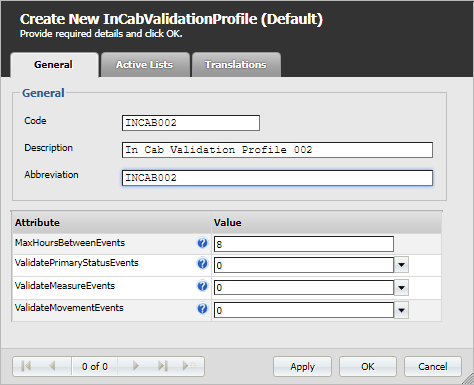
The profile contains the following attributes:
| Attribute Name | Description |
|---|---|
| MaxHoursBetweenEvents |
Sets the maximum number of hours between events submitted by the same operator. If the value is exceeded, any events older than the last event before that gap won't be displayed during validation.
|
| ValidatePrimaryStatusEvents | If ValidatePrimaryStatusEvents is set to Yes, primary status validation will be enabled |
| PrimaryStatusAction | Action providing a list of statuses that will be shown to the user on editing/adding a primary status during validation |
| ValidateMeasureEvents | If ValidateMeasureEvents is set to Yes, measure validation will be enabled |
| MeasureAction | Action used to filter measures displayed during validation of measure events. Also used when editing measure events during validation |
| MeasureLocationAction |
Action that provides locations when editing measure events during validation |
| ValidateMovementEvents |
If ValidateMovementEvents is set to Yes, movement validation will be enabled |
| LoaderAction |
Action that provides loaders when editing movement events during validation |
| SourceLocationAction | Action that provides source locations when editing movement events during validation |
| DestinationAction | Action that provides destination locations when editing movement events during validation |
| MaterialAction | Action that provides material when editing material grade events during validation |
| MovementMeasureAction | Action that is used to filter measures displayed during validation of movement events. Also used when adding or editing movement events |
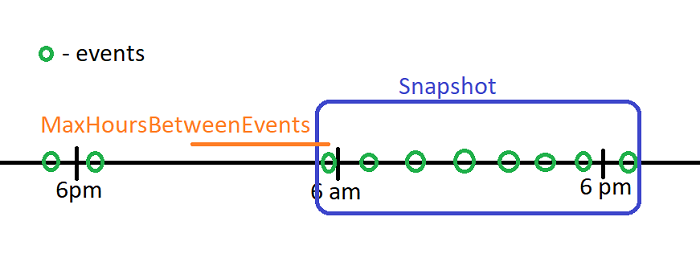
The Details screens display information on the events submitted by the operator within the MaxHoursBetweenEvents value. For information on the types of Details screens available, see In-Cab Validation Screens.