

Targets Hierarchy
In the Reporting service, the available values that you see listed for the Budget object of a Budget report are target items defined in the Targets service. There could be hundreds of items defined for all of the possible budget reports that you need to generate for equipment, locations and personnel.
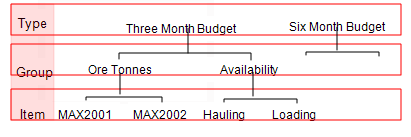
To make it easier to manage a potentially large number of items, targets are organised in a three-level hierarchy. The instances at each level of the hierarchy are user-defined:
Targets
The highest level of the hierarchy. At your site you may use targets to differentiate between short term and long term planning objectives—a Three Monthly Budget or a Six Monthly Budget for example. There must be at least one top-level “target”.
For information on creating targets, see Targets.
Groups
The mid level of the hierarchy. A target can have many groups. A group can comprise many target items, which form the lowest level of the hierarchy. Group names appear in the Group drop down list in the target panel. To display all the items that belong to a particular group, you can select it from the list.
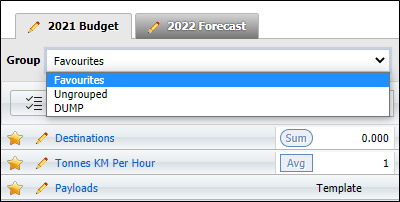
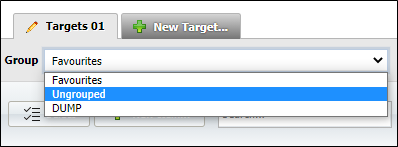
A group is a good way to identify items that are similar in some respect - those quantifying tonnage, those pertaining to availability, those dealing with the crews and so on. By default, if an item is not allocated to a group it will be listed as Ungrouped.
Group and Subgroup are optional attributes that are set when you create or modify a target item:
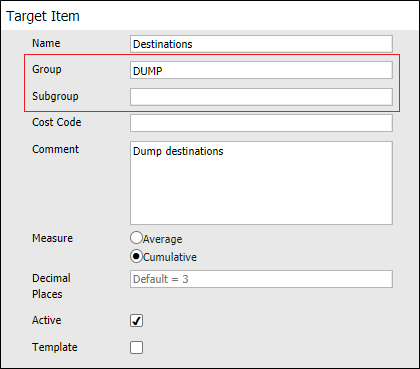
A group can have any number of subgroups. A subgroup appears as a subset of values in the Daily Targets report. For example, a group Material may have subgroups of Ore and of Waste. The Daily Targets report lists the Material actual and the target values, with subheadings of the values for Ore and for Waste.
Items
The lowest level of the hierarchy. To create or modify a target item see: Target Items
An item appears as one of the list of available values in the Budget object of Budget reports. See: Targets and Reporting
Objects and Measures
Items are defined in terms of objects. Objects define an association between the following:
- Units of equipment or a location. For example, Hauling or LocA.
- A status or source. For example, Loading or Source1.
- A measure. For example, Tonnes or Seconds.
A target item must have at least two objects:
- An object that is not a measure. Select a non measure object from a list of possible objects customised in your database. This object, in some way, identifies what is to be measured.
- A measure object. For example:
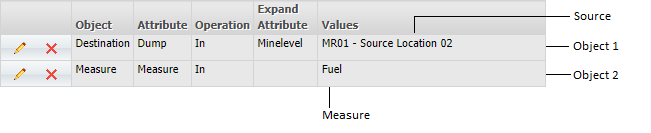
More details on measures are included below:
Measures
The association between an object (source, equipment, operator, status, etc.) and a measure is established when you define a target item. There are two types of measure that can be defined:
| Measure | When defining an item, a measure type appropriate for the associated object is selected—Bits Used, 2.0m Face Holes, EngHr, Fuel, Litre or Tonnes, for example. Thus, an item defines the litres of fuel used by the water trucks, the tonnes the hauling fleet transported or the mesh sheets used on drive 3A, etc. |
| Filter Measure | This is a measure that has been filtered by a criteria—status, for example. To quantify the hauling fleet's operating hours, the hours attributed to the hauling fleet would be filtered by status = Operating, for example. There are three categories of FilterMeasures |
There are three categories of Filter Measure:
- Filter Measure. This includes the summation of:
- All Hours. When status = Down, Idle and Operating.
- Available Hours. When status = Idle and Operating.
- Down Hours. When status = Down.
- Idle Hours. When status = Idle.
- Operating Hours. When status = Operating.
- Filter Measure Calc. Filter Measure Calc is a group which defines the calculations of states presented as a percentage (%):
- Availability. Operating+Idle/(Operating+Idle+Down)*100. Available hours divided by total hours.
- UofA, the utilisation of the availability. Operating/(Operating+Idle)*100. Operating hours divided by available hours.
- Utilisation. Operating/( Operating+Idle+Down)* 100. Operating hours divided by total hours.
- Filter Measure Group. The Filter Measure Group is defined as the Standard KPIs which are the standard set of performance indicators of Availability, UofA and Utilisation. This is a percentage (%) performance indicator. The user-defined target and the report is defined in terms of percentages—percentage utilisation of the drill rigs, percentage availability of the boggers and so on.
The above states have been configured for the database that you are using. On site the actual status names may differ.
Using this indicator may highlight that the hauling fleet was utilised for only 50% of the time that it was available. The budgeted hauling KPI may have been 70%. Why were they not being used for more productive hours? Maintenance problems? No operators? Too many in the fleet? Decisions need to be made.
Targets versus actuals
In Targets, the user allocates a target value to an item. Thus, each item has two associated measures:
- The actual measure value stored in the database.
- The user-defined target value for the item.
Budget reports may present these two measures in a spreadsheets or as a graph.
If the period defined for the report extends beyond current operations, the projected or future target line displayed on some of the reports can be used for future planning.