

Calculation of Grades
CSV files created from model depletion are used to import domain elemental grades for locations on your system.
The elemental grades change with every firing. For example, when a firing value changes from 1 to 2 (i.e. when the area is depleted), the new firing will come with a new set of elemental grades.
Formula
The following formula is used by Pitram Connect to calculate the grade.
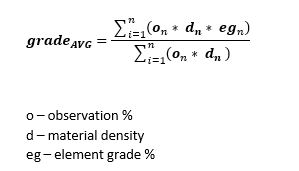
Note: Elemental Grade and Density can sometimes be used interchangeably. For the calculation of grades, the formula uses Density and it is imported together with the Elemental Grade. If Elemental Grade or Density are not available, the calculation will be performed as if their value was 0.
Showing Calculated Grades
Pitram Connect can be configured to show only single elements, for example Ni, and the geologist only needs to make a cut off grade decision for that element.
The server side needs to know all calculated grades. These, however, will be calculated on the Pitram Connect side because they depend on the observation values.
Loading Elemental Grades into Pitram Connect
Elemental grades can change after every firing and are required to be uploaded to Pitram Connect at the beginning of the shift. This will ensure the geologists will always work with up-to-date elemental grades.
The elemental grades will not change during a shift for a location. Only the % volume will change, affecting the calculated grade. For calculations, Pitram Connect uses the latest import of elemental grade for a location.