

Client Icon Overlays
Desktop
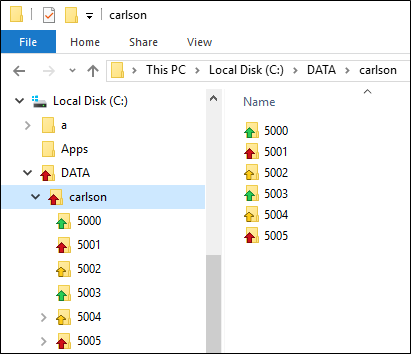
On desktop clients, icon overlays indicate the sync status of watched files and folders:
| Icon | Status | Description |
|---|---|---|

|
File uploaded successfully | The file has been successfully uploaded from a desktop to the destination mobile. The source can be any desktop machine (not just the local user's machine). |

|
File downloaded successfully | The file has been successfully downloaded from the mobile to the user's machine (desktop). |

|
File upload in progress | The arrow indicates the file is being uploaded. This status covers both the transfer from the user's machine to the PFD server and from the PFD server to the destination mobile. The source of the transfer can be any desktop machine. |

|
File upload failure | The arrow indicates the file upload failed. This status covers both the transfer from the user's machine to the PFD server and from the PFD server to the destination mobile. The source of the transfer can be any desktop machine. The status includes connection failures as well as other checks, e.g. the file size being too large |

|
Empty folder | There are no files in the folder. |

|
Folder with downloaded files only | The folder contains 1 or more files downloaded from the mobile AND no files with any other status |

|
Folder with uploaded files only | The folder contains 1 or more files successfully uploaded to the mobile AND 0 or more files downloaded from the mobile AND no files with any other status. |

|
Folder with at least one file being uploaded | The folder contains 1 or more files being uploaded to the mobile AND no files that failed to get uploaded. |

|
Folder with at least one file upload failure | The folder contains 1 or more files that failed to upload. |
| Icons should refresh automatically when their sync status changes. Folder icons and icons in the tree view may need to refreshed (by navigating in explorer or hitting F5 | ||
Installing and Registering
Icon Overlays are installed and registered with Windows. Registry entries can be found at:
HKEY_LOCAL_MACHINE\SOFTWARE\Microsoft\Windows\CurrentVersion\Explorer\ShellIconOverlayIdentifiers
and look like:
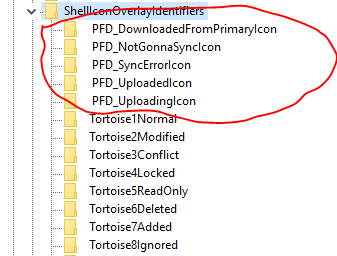
- Ordering is important here hence the leading spaces " ", only about the top 11 ShellIconOverlayIdentifiers are used by Windows - the limit being 15 and some are reserved for Windows.
Mobile Client Status Icon
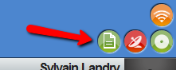
On mobile clients, an icon shows the status of the local File Distribution Service. Colours are used to indicate each state:
| Colour | Status |
|---|---|
| Red | The client connector is not running. |
| Orange | The client connector is running but is not connected to the PFDS server. |
| Green | The client connector is running AND is connected to the PFDS server. |
| The client connector is DOWNLOADING or has just downloaded a file. The icon is replaced by a download animation for 10 seconds or until the download has finished. |
If PFDS is not installed, then no icon is shown.