

New Pillar

When you click the New button, the cursor will change to allow you to begin digitising a new polygon in the design. When you click a point, the constraint polygon will begin. You can click additional points in the constraint to create the polygon. To finish the string, either double-click as you digitise the last point or press Escape (Esc). The new string will be auto-closed when you have finished. The constraint polygon is shown in Red in the design:
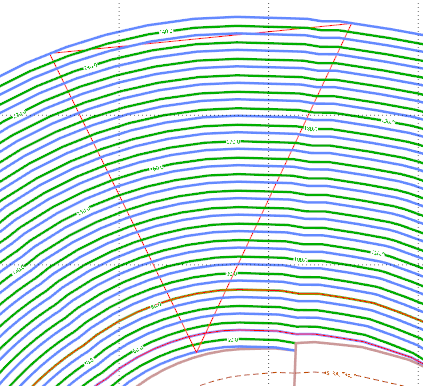
In Shrinking mode (Pit/Down, Dump/Up), a Pillar (Internal) constraint will place the pit build area inside the constraint where it intersects with any pit lines. No constraint will occur if there is no intersection. In Expanding mode (Pit/Up, Dump/Down), constraints always expand the pit build area.
Note: Pillars set above a bench will not influence the pit design, but if a pillar polygon is set below the bench in which it is supposed to be, the pit triangulation of the shell is impacted. For this reason, the application will check for and ignore an internal pillar/pit if it is located outside of the current level main boundary.