

Task Types
Task Types that have been configured globally, on theTasks tab of the Administration window, are available for selection as part of your workspace settings. Note: you must have administrator privileges to access Workplace Settings.
To select task types for the current workspace:
-
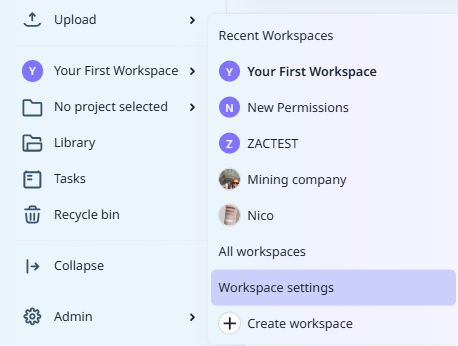
From the Navigation menu: Click on <the name of the current workspace>.
-
Select Workspace Settings.
-
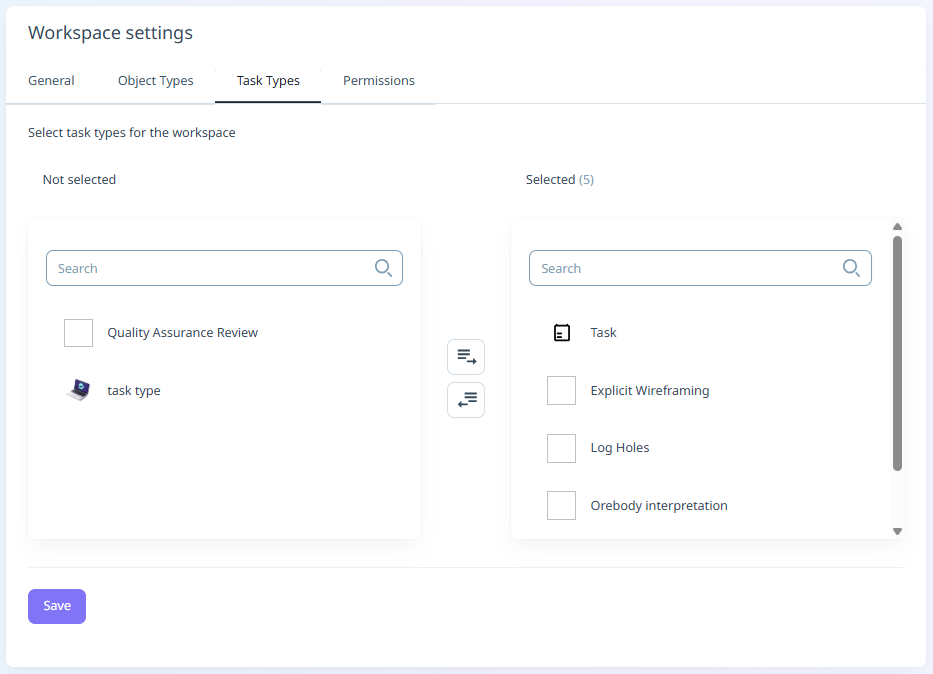
Click to select the Task Types tab:
Not Selected
The task types that have been configured on the Task Types tab of the Administration window are available for selection in the Not selected pane. Click on the task types to move them to the Selected pane.
Alternatively, you can click the Add All button to add all of the Not Selected items to Selected:

Selected
The task types that you have added to the workspace are listed in the Selected pane. You can move an item to the Not Selected pane by clicking on the task type in the Selected pane.
Alternatively, you can move all of the Selected items to Not Selected using the Remove All button between the panes.

Save
Click Save to save your changes.
Note: To use the Create Task Types option, you must have administrator privileges.