

Shifts
The Shifts option in Pitram Service performs two functions:
- Locking shifts. A locked shift prevents retrospective changes being made to that shift.
- Reprocessing shifts. Used for accessing data that has been entered retrospectively.

Reprocessing shifts
Data is automatically saved and displayed for a period covering a number of shifts. Changes made to the data prior to that period (i.e. any retrospective changes) is saved, but not displayed. The shifts covering the data that was changed must be accessed or reprocessed to make them available to Pitram Portal. The period of shifts for which the data is displayed is configurable. This is usually undertaken when Micromine Pitram is installed.
If a change has been made to any of the events in a shift using Event Editor, a warning message will be displayed against the shift. The message highlights that the shift should be reprocessed to ensure you are working with the most up-to-date information.
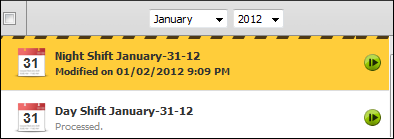
If you reprocess the shift, the warning will be removed.
Historical shift reprocessing information can be viewed on the Reprocessing History page.
Reporting service
If working in the Reporting service, warning messages will be displayed if a shift is:
- Recommended to be reprocessed.
- Currently being reprocessed.
You will be warned that the report may include incorrect data.