

Bluetooth Test Tools
Bluetooth Low Energy (BLE) beacon tagging can be integrated with Micromine Pitram Mobile. BluetoothReceiverProfile and BluetoothTag reference data items can be configured with Waypoints for the Mobile Unit to receive Hardware Diagnostics messages.
With DisableBluetooth set to TRUE and a TestModeConnectionString configured for a BluetoothTagProfile, integration can be carried out in test mode, which will simulate bluetooth events. The Bluetooth Test App can be used for setting active tags when TestMode is on.
Details on how to configure and use the App are as follows:
Bluetooth Test App
The Bluetooth Test App installer is located in the PITRAMTestTools installer (BluetoothTestApp.exe).
When the application is installed, run it to configure the test TagIDs.
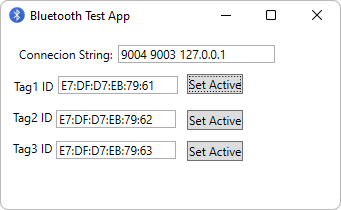
Type in the MacAddress of a tag in the Tag ID field and click Set Active to make it active in Micromine Pitram Mobile.
You can also run HelperX_BluetoothBeacons.batch in the simulator.