Copy

Copy From
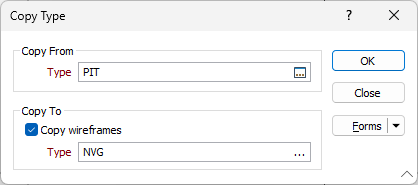
In the Copy Type form, double-click (or click on the Select icon) to select the Type you want to copy from.
Copy To
Select the Copy wireframes check box if you want to copy the contained wireframes of the source type to the destination type.
In the Type box, enter the name of the type, you want to copy to.
If you enter (or click on the ellipsis to select) the name of an existing type and there are contained wireframes, a warning is displayed. If you choose to copy to an existing type, any contained wireframes will be deleted.
Forms
Click the Forms button to select and open a saved form set, or if a form set has been loaded, save the current form set.
OK
Click OK to begin the Copy process.