

New

Alternatively, in any form where a wireframe type can be selected, click on the Wireframe Type response and press F5.
You can also click the New Type button in the Manage Wireframes.
- In the New Type dialog, enter a name for the new wireframe type.
If you want to overwrite an existing wireframe type, double-click in the Type box to select a type.
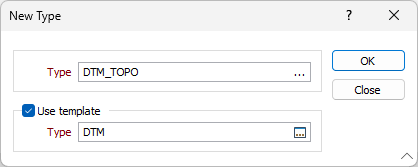
- Select the Use template check box if you want to base the new type on an existing wireframe type. Double-click in the Type box to select the type you want to use as a template.
- Click OK.
The User Defined Attributes dialog is opened. If you based the new type on a template, the attributes of the base type are inherited by the new type.
- Use the buttons in the User Defined Attributes dialog to rename, delete, add new user attributes, or copy user attributes to the wireframe type you have created.
- Click Close to return to the Wireframe definition dialog. The type you created is added to the list of wireframe types for the project.