Animation Options
On the Home tab, in the View group: Select Animation Options to adjust the increment and speed of the animation. You can also choose to show the source/destination line and which properties of the haul profile to show in the animation.

Animation Element Visibility
Use the sub-menu to toggle between an unfiltered or a filtered (by animation date) view.
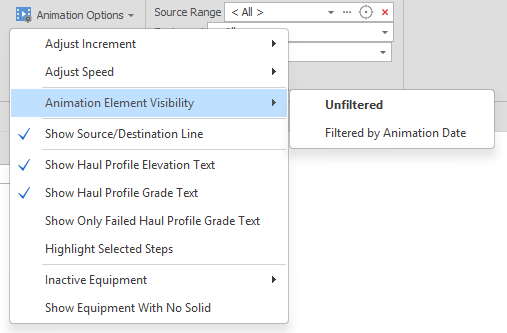
In the Animation Window, Shape, Block Model, Grid, Triangulation and Text elements can all be shown or hidden at certain dates in the schedule.
For more information, see: Set Date Limit Properties
Highlight Selected Steps
Select Animation Options | Highlight Selected Steps to highlight solids in the Animation Window from the steps selected in the Output Schedule Window or the tasks selected in the Gantt Chart Window.
For more information, see: Highlight Selected Steps
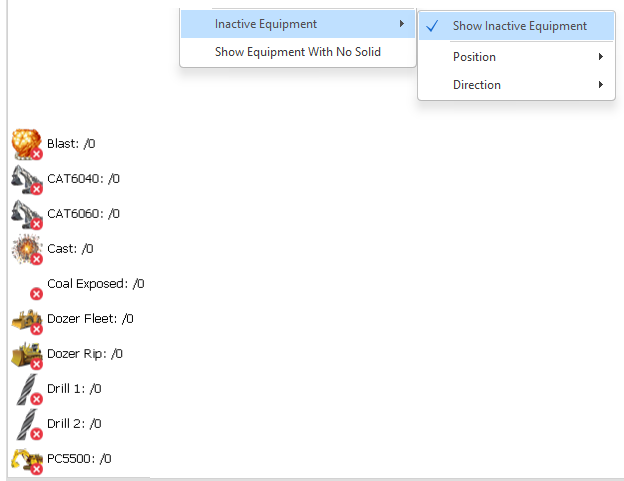
Inactive Equipment
Toggle the Show Inactive Equipment option to show a list of inactive equipment in the animation. You can then select a Top Left/Right or Bottom Left/Right Position and set the (Horizontal or Vertical) Direction in which the equipment is listed.
Equipment with No assigned solid may also be listed.