

Recording truck cycle events
Truck cycle events can be recorded automatically or manually.
To record events automatically
Trucks must be fitted with GPS receivers in order to record SET LOADER, QUEUE or QUEUE TO DUMP events automatically. The truck operator may also record these events manually if his cab is fitted with a mobile device.
Trucks must be fitted with a VIMS or PLM system in order to record LOAD or HAUL events. The truck operator may also record these events manually if his cab is fitted with a mobile device.
To record events manually
To record events manually from Data Acquisition, you must be in radio contact with the truck and loader operators.
- Make sure the Loaders & Trucks panel is the active panel.
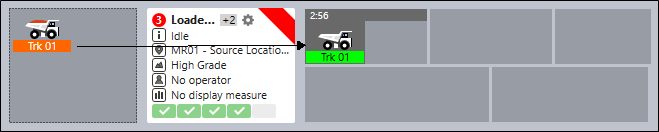
- To begin a cycle, you must move a truck into the Truck Cycle panes to the right of the Loader.
In the following example, truck DT003 has already been assigned to EX 067. To set it to 'Loading' it can be dragged and dropped as shown below:
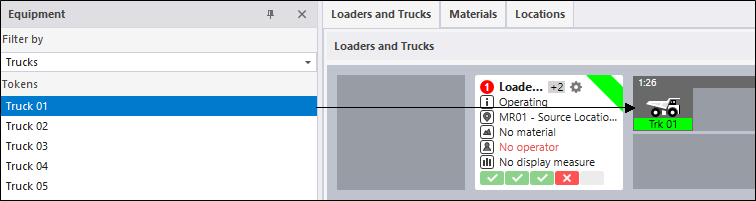
A truck can also be dragged and dropped from the Equipment pane. Note that when you move a truck, you can also move it to a different loader in the same panel, or to a loader in another panel.
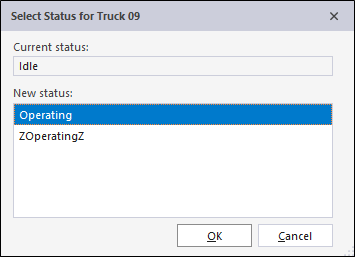
- Whenever you move a truck you will be prompted to
 confirm or change its status.
Moving through the cycle
A truck can be set to Loading, Hauling, Queuing at Dump, Travelling Empty, or Queuing.
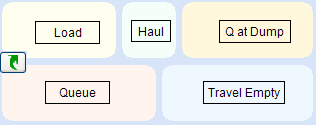
The cycle menu
As an alternative to using the mouse to drag and drop equipment, you can right-click on an equipment unit (either in the Equipment list or in the display) and select an option from the right-click Set Cycle Status menu.
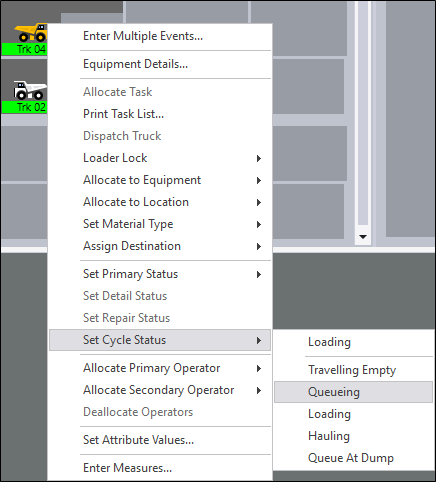
Note: Alternatively, if you double click the truck icon, that truck will move to the next stage in the cycle. Each double click will move the truck one step forward in the cycle.
A How do I record a truck dump? event is recorded separately and is not available on the Cycle menu. See: How do I record a truck dump?
The system will validate the movement of a truck depending on its current status.
For example:
You cannot set a truck directly as Hauling or Queue at Dump unless it has already been loaded. Similarly, you can not dump a truck unless it is either hauling or queuing at a dump. If you try to move a truck to an inappropriate position, an error message will be displayed:
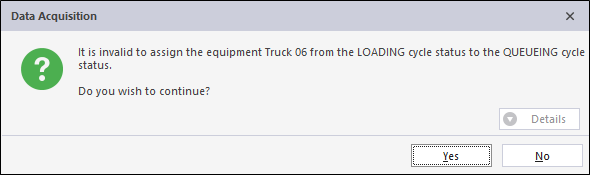
In most cases you will click No. Do not continue with the assignment unless there is a good reason to do so. i.e. the reported status of a truck was wrong and needs to be corrected.
| Once trucks has been added to a cycle, you can use the Set Cycle Status menu, or double click the truck icon, to move them to the next step in the cycle. A Dump event is the exception to this and must be recorded by moving the truck to a dump destination. | |