

Loader Efficiency
The View | Loader Efficiency window in Data Acquisition allows the dispatch operator to set the target efficiency and priority for each loader within a dispatch region.
Two factors influence the production rate of a loader:
- Efficiency. Efficiency may take into account how efficient a loader has been historically, or how efficient it needs to be for a particular shift. This is a user-defined value and may vary from shift to shift.
- Number of trucks servicing the loader. If the loader is not fully utilised because of lengthy truck waiting times, production will drop. With truck wait times at a minimum, efficiency can be maintained and production targets achieved.
The Loader Efficiency window requires a user-defined target efficiency and a loader priority to be entered for the displayed loaders. With this information, route travel times, truck capacities, and other factors, the optimum target number of trucks and the production rate that will be achieved can be displayed.
The information generated by the Loader Efficiency window is used by the dispatch system to compute a score for each loader.
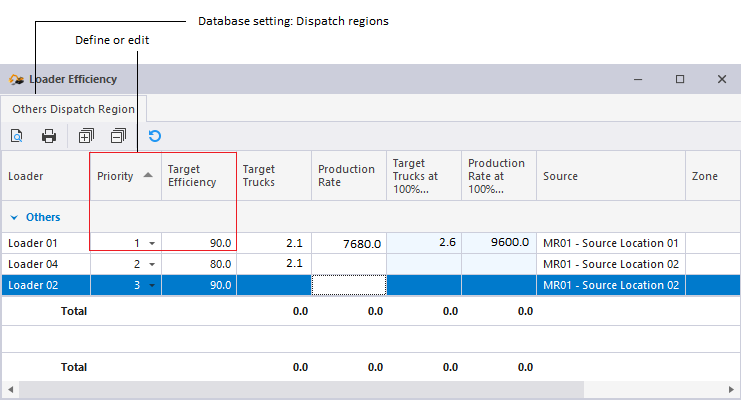
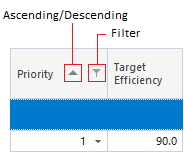
Priority and Target Efficiency
These two columns can be edited. When you open the Loader Efficiency window, the Priority value displayed will reflect the Loader Priorities set in Data Acquisition.
Changing the value in the Loader Efficiency window changes the value associated with a loader in the Loader and Trucks Panel, and vice versa.
Changing the Target Efficiency affects the values in columns: Target Trucks, Production Rate, Target Trucks at 100% Efficiency and Production Rate at 100% Efficiency.
The tabs, at the top of the window, identify the Dispatch Region. Click on a tab to present the data for the loaders within that region.
A truck allocated to a loader in a dispatch region is restricted to that region. The dispatch system takes into account loader location and dispatch regions when allocating a truck to loader.
The following columns are displayed in the Loader Efficiency window:
Loader
Loader Groups - for example Large Trucks and Small Trucks in the example screenshot - are configured in the Pitram Portal as a reference group (typically under Configuration Items | Equipment).
Every loader has a LoaderGroup attribute. Loader groups provide a way of categorising trucks by capacity. The Dispatch system will take the capacity of a truck into account before allocating it to a loader.
You can use the + - button to open or close a loader group..
Priority
As part of the Dispatch process, it is useful to be able to increase the priority of loaders in particular locations, to ensure that they are adequately trucked. This will also help to ensure that the desired grade or blend is achieved.
In Data Acquisition, a Loader Priority attribute can be allocated to loading equipment. These priorities and other inputs can then be combined to provide a final score that can be used to determine which loaders are allocated to which trucks.
In a panel, the priority of each loader is shown to the left of the loader name:
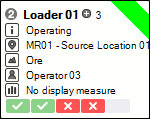
A priority is a positive integer which ranges from 1 (the highest priority) to n. When a truck becomes available it will be allocated to the loader with a high priority (1, for example) in preference to one with a lower priority. When attributing priority to a loader, factors such as the capacity of the loader, the experience of the operator, the quality of the material mined, the efficiency history of the loader, etc. may be taken into account.
Factors, other than priority, may also determine which loader a truck is allocated to:
- Is the Loader Locked?
- Is the truck restricted to a Dispatch Region?
- The truck travel time to the loader.
- Loader is already adequately trucked. Is waiting for a truck at a minimum?
- The loader Equipment KPIs production targets. Are they behind or on schedule?
- The loader's primary status. Is it Operating or Down?
- The Dispatch Weightings applied to some of these inputs.
Otherwise, if a truck is available it will be allocated to the loader with the highest priority.
When allocating trucks the Dispatch system will always aim to minimise loader wait times and truck queuing times, and maximise the tonnes hauled.
Target Efficiency
A dynamic attribute calculated per equipment unit.
Target Trucks / Target Trucks 100%
Target Trucks 100% = (Load Time + Haul Full + Haul Empty) / Load Time
Target Trucks = (Target Trucks 100%) * target efficiency
To get the haul times, we need the location, destination, and CalcTruck model (see below). This attribute is obtained from the ZoneDispatchMapping reference group which maps the location and zone (see below) to the material destination.
Production Rate/ Production Rate(100%)
From the LoaderGroup attribute of the loaders we can get an attribute CalTruckModel. This is the model of a truck which is used to look up Capacity.
Production Rate 100% = (60 / Load Time in minutes) * Capacity of Cal Truck
(60 = number of minutes in an hour)
Production Rate = Production Rate 100% * (Target Efficiency / 100)
Source
The source location of the loader as allocated.
Zone
All mobile equipment can be assigned a Zone attribute. Zones are configured in a DispatchZone reference group in the Pitram Portal. The Zone attribute for equipment can also be set in Data Acquisition as a dynamic attribute.
Destination/Material
Lookup values taken from the ZoneDispatchMapping reference group in Reference Edit.