

Export Single Layer
When either the Design window or the Animation window is open, you can export layers to a file in XML format. Multiple layers are written to an XML file (*.xml).
When exporting a single layer, different file extensions may be used to differentiate between a standard design layer or a haulage network layer.
Tip: Exporting a single layer in XML (*.xml) format allows a Design layer to be imported as a Network layer and vice versa. The conversion is applied during the Import process.
| Layer Type | File Filter Options |
|---|---|
| Design | Design Layer (*.layer); XML (*.xml) |
| Haulage Network | Network Layer (*.hnl); XML (*.xml) |
 Export an individual Design layer
-
In the Design Data pane, under the Layers node, right-click on the name of a layer.
-
Select Export | Layers from the right-click menu.
-
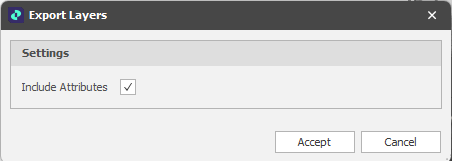
Under Settings, select the Include Attributes check box to export the attributes of the objects you are exporting. Clear this check box to only export the geometry.
-
You will be prompted to navigate to the folder location of the .xml or .layer file you want to save. The default folder is your project folder.
Export an individual Haulage Network layer
-
In the Design Data pane, under the Haulage Network Layers node, right-click on the name of a layer.
-
Select Export | Network Layers from the right-click menu.
-
Under Settings, select the Include Attributes check box to export the attributes of the objects you are exporting. Clear this check box to only export the geometry.
-
You will be prompted to navigate to the folder location of the .xml or .hnl file you want to save. The default folder is your project folder.
Import a Design Layer as a Network Layer
- Export the Design Layer as an XML (*.xml) file. See "Export an individual Design layer".
- In the Design Data pane, right-click on the Haulage Network Layers node, on an underlying folder, or the name of a layer and select Import | Network Layer.
- Select the Design Layer file you just saved as an XML file.
Spry converts the layer as it imports. The layer, its folder, and its shapes all arrive as Network Layer equivalents.
Import a Design Layer as a Development Network Layer
- Export the Design Layer as an XML (*.xml) file. See "Export an individual Design layer".
- In the Design Data pane, right-click on the Development Network Layers node, on an underlying folder, or the name of a layer and select Import | Development Network Layer.
- Select the Design Layer file you just saved as an XML file.
- Spry converts the layer as it imports. The layer, its folder, and its shapes all arrive as Development Network Layer equivalents.