

Export Data
 Overview
When you view Table Data, any of the tables listed in the Data object tree can be exported by right-clicking to select an Export (Data or Table Structure) option. The same options are also available on the Import/Export menu when a data table is open:
When you export the data in a table the data is exported to a .csv file which includes:
- A header that lists Level and Field Names
- Positions and data items for each Leaf
- Solids data files (individual Micromine Spry .solid files or individual .00t Vulcan format files)
- Solids archive files (Micromine Spry .solid files or .00t Vulcan format files in a Compressed Archive (.zip) file)
To export table data:
-
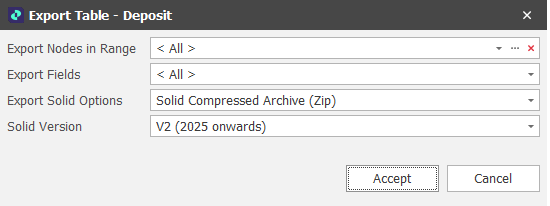
Right-click on the Table in the Project Explorer and select Export | Data:
-
Select the Range you want to export (default: All).
-
Select which Fields to export (default: All).
-
Choose from several Export Solid Options. This includes whether to export individual files or export to a Solid Compressed Archive (Zip) file. The default file format is Micromine Spry Solid file format, however Vulcan .00t file format is also available.
-
You can also export a specific version of Spry solids by selecting a Solid Version:
Note that current and future version solid formats may be incompatible with earlier versions of the application.

-
Click Accept to begin the Export.