

Deploy tags
A Pitram tagging system can be installed on site to track equipment and personnel.
A tagging system comprises two main components— electronic tags attached to equipment and personnel, and tag readers installed at defined Waypoints. When a tagged unit of equipment or person is detected within the vicinity of a tag reader, the date-time and a tag identification number are recorded and stored in the Pitram database.
Tagging systems are typically deployed at underground mines where wireless communications are infeasible, or at surface mines where wireless communications are unreliable.
Before a Pitram tagging system can be deployed, the following prerequisites must be met:
- A Mine Radio System (MRS) tagging system has been installed and configured.
- The Manage Connectors component of the Pitram System service (System | Manage Connectors | Pitram | Configuration) has been correctly configured.
- Waypoints have been defined with unique tag reader codes. It is this association between a waypoint and a tag reader that defines the location of the tag reader. This is best achieved by using the same identifier for both the WaypointDeviceID attribute and the Tage Reader Identity Code attribute.
- Tags have been defined in the Pitram Reference Edit service (Groups | Configuration | Miscellaneous | RFTags.
With the introduction of a tagging system to track equipment and personnel, safety and efficiency are greatly improved on site.
The implementation of a tagging system requires that the following be defined in Reference Edit:
- An association between the waypoints and the tag readers:
WaypointDeviceID = TagReaderID
- Tags tokens for the equipment units and the personnel to be tagged. Each tag is identified by a unique:
RFTagID
Deployment
To deploy the reference groups for tagging:
- Select Groups | Configuration Items | Miscellaneous | RFTags.
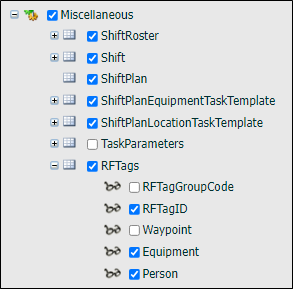
- Select Other Actions | Deploy Reference Group.
- Select the following attributes:
- RFTagID. The tag identification.
- Equipment. Select the equipment unit that is associated with the RFTag.
- Person. Select the person who is to be associated with the RFTag.
Define Tags
To define a tag:
- Select Groups | Configuration Items | Miscellaneous | RFTags.
- Select Checkout to make the reference group writeable.
- Click New RFTags on the toolbar.
-
Define the following:
Option Select Code P_34 Tags can be used to track equipment and personnel. You could use a coding system to identify those tags that are assigned to equipment and those that are assigned to people. For example: - Prefix E = Equipment.
- Prefix P = Person.
Description P_34 Abbreviation P_34 Attributes FRTagID 34 A unique tag code. Equipment Only defined if the tag is for an equipment unit. Person <Person1> The name of a person selected from the drop-down list. 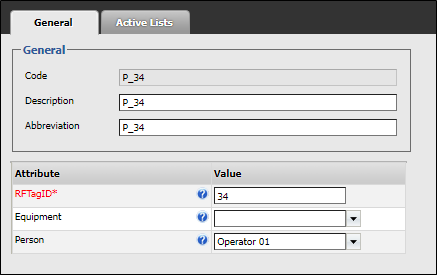
Note that when both the Equipment and Person attributes are defined, the system will use the Equipment value. The time-date that the equipment unit passed the tag reader will be recorded.
- Click OK to save the new tag. Continue from Step 3 to create more tags for equipment or people.
- When you have finished creating tags, click Checkin and Publish your changes.