

Configuring Zones
Zones are configured in the Pitram Reference Edit service. A zone is an area on site defined by a closed boundary. To identify the boundary of the zone, a polygon is digitised in Micromine Australia Pty Ltd (preferred) or some other third-party application. Each zone is defined in terms of a material type.
To define a zone in Reference Edit:
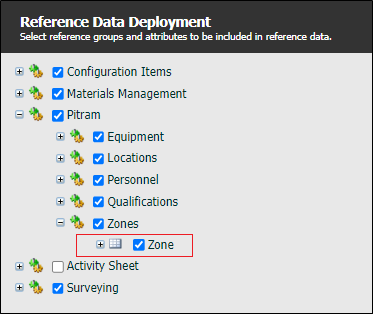
- Deploy the Pitram | Zones | Zone reference group.
- Publish the changes that you have made to make them available to those Pitram applications and services that need to reference zones.
- Digitise the boundary of the zone and save it to a Micromine Australia Pty Ltd String file (.str). The boundary must be a closed shape with five or more points.
- Go to Configuration Groups | Pitram | Zones to add a new token.
- Checkout the reference group to make it read-write so that you can create a new token.
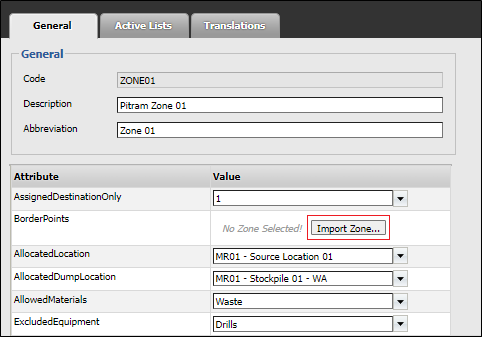
- Define the Zone with the following attributes:
| Attribute | Description |
|---|---|
| AssignDestinationOnly | Boolean value. |
| If the AllocatedDumpLocation attribute is defined: 0. If dumps to the destination will NOT be monitored even though the AllocatedDumpLocation attribute is defined. 1. If dumps to the destination location will be monitored. |
|
| BorderPoints | Click on Import Zone to define the zone outline file (.OUT). |
| Allocatedlocation | Select a location with the appropriate associated material type. |
| It will typically be a source location. | |
| AllocatedDumpLocation | Detect a dump location with the appropriate associated material type. |
| AllowedMaterial | Select the material type that will be monitored. |
| ExcludeEquipment | Select an active list which describes all the equipment types that should not be in the zone. |
| AllowedAssignedDestinations | Select an appropriate active list of destination locations. |
| Do not define this attribute if only one destination is allowed. | |
| AssignedDestination | Select a particular destination location. |
- Click OK to save the Zone definition.
- You must Check-in your changes to the reference group and publish the changes to make them available to those Pitram applications and services that need to reference zones.